Your website should be your best salesperson. If it isn't bringing in leads, the problem is almost always the content on the page—the words and pictures you use to tell people what you do.
This guide will show you how to write website content that turns casual visitors into paying customers, even if you’re not a tech expert and are busy running your business. By the end of this article, you’ll know exactly how to turn your website into a 24/7 lead generator—without rebuilding the entire thing.
Turn Your Website From a Brochure Into a Salesperson
Let's be blunt: your website's main job is to convince potential customers you can solve their problem. Too many business owners get lost in design tweaks and forget that the words are what actually make the sale.
Good design gets attention. Great content gets customers.

Think about it from your visitor's perspective. They land on your site with a problem. They aren't interested in your company history or mission statement, at least not at first. They are scanning your page for immediate answers to just three questions:
- Do you understand my problem?
- Can you actually fix it?
- Why should I trust you?
Effective website content answers these questions instantly. It speaks directly to your customer's worries, builds confidence, and makes it obvious what they should do next.
From Brochure to Salesperson: A Real-World Example
A website that acts like a brochure is static. It just lists what you do and gives a phone number. A website that works like your best salesperson is dynamic. It anticipates questions, handles objections, and guides visitors toward a sale.
The only difference is the content. It's about driving targeted traffic that actually converts, not just getting random clicks.
- Brochure Website: A roofer's site simply says "We offer roofing services, shingle repair, and gutter installation. Call us."
- Salesperson Website: The same roofer's site says, "Worried about a leaky roof? We find and fix leaks fast to protect your home from water damage. Get your free, no-obligation inspection today."
The "salesperson" version connects with a specific worry and offers a clear, risk-free next step. That's the goal.
Building Your Website Content Blueprint
Don't write a single word until you have a plan. I've seen countless business owners jump straight into writing, only to end up with a site that doesn’t bring in a single lead. A simple content blueprint is the difference between a website that just sits there and one that actively works for you.
This isn't some complicated marketing document. It’s a simple map. It connects what your customers are searching for to the pages on your website, ensuring every piece of content for your website has a clear purpose.
Before you get lost in the details of how to develop content strategy, just ask yourself one question: “What are the top 5 problems my customers need solved?” Your website's job is to answer those questions.
Map Customer Questions to Your Pages
Get inside your customer's head. What are they typing into Google right before they realize they need someone like you?
- A home inspector's ideal client isn't searching for "local home inspector." They're searching for "signs of a bad roof" or "is my foundation cracked?"
- A business coach's client might be looking for "how to get more clients for my small business."
- A landscaper's client could be typing in "how to fix a patchy lawn in Texas."
Your job is to build the pages that directly answer those questions. Each answer becomes a destination on your site, turning a random search into a potential lead. This simple mapping process is the foundation of a real content plan. For a deeper dive, check out our guide to building a practical content strategy framework.
A common mistake is building a website based on what you want to say. Instead, build it based on what your customers need to hear. This simple shift in perspective changes everything.
The Must-Have Pages for Your Blueprint
Every small business website, whether you're a plumber or a consultant, needs a few core pages. Don't feel pressured to build out a massive site. Focus on making these essential pages work hard for you.
Each one has a specific job to do, guiding visitors from just looking to taking action.
Here’s a quick-reference table for the essential pages every small business website should have.
Essential Pages Your Website Needs
| Page Type | Main Goal | Must-Have Content |
|---|---|---|
| Homepage | Grab attention in 3 seconds and direct traffic. | A clear headline, a brief "what we do," and links to key pages. |
| About Page | Build trust and a personal connection. | Your story, your "why," and photos of you or your team. |
| Services/Product | Explain your value and get people to inquire. | Focus on the problem/solution, list clear benefits, and have a strong call to action. |
| Blog/Resources | Answer customer questions and attract search traffic. | Helpful articles that solve specific problems for your ideal customer. |
| Contact | Make it easy for leads to get in touch. | Phone number, contact form, location/map, and business hours. |
By planning these pages first, you create a logical path for your visitors to follow. This blueprint makes the actual writing process faster and far more effective because you know exactly what each page needs to accomplish before you start.
Writing Core Pages That Convert
You’ve got your blueprint. Now comes the part that does the heavy lifting: writing the content for your website that turns a casual visitor into a paying customer.
We’re going to focus on the three pages that matter most: your Homepage, About page, and Services pages. These are your money-makers.
Getting this right isn't magic; it's a simple process.
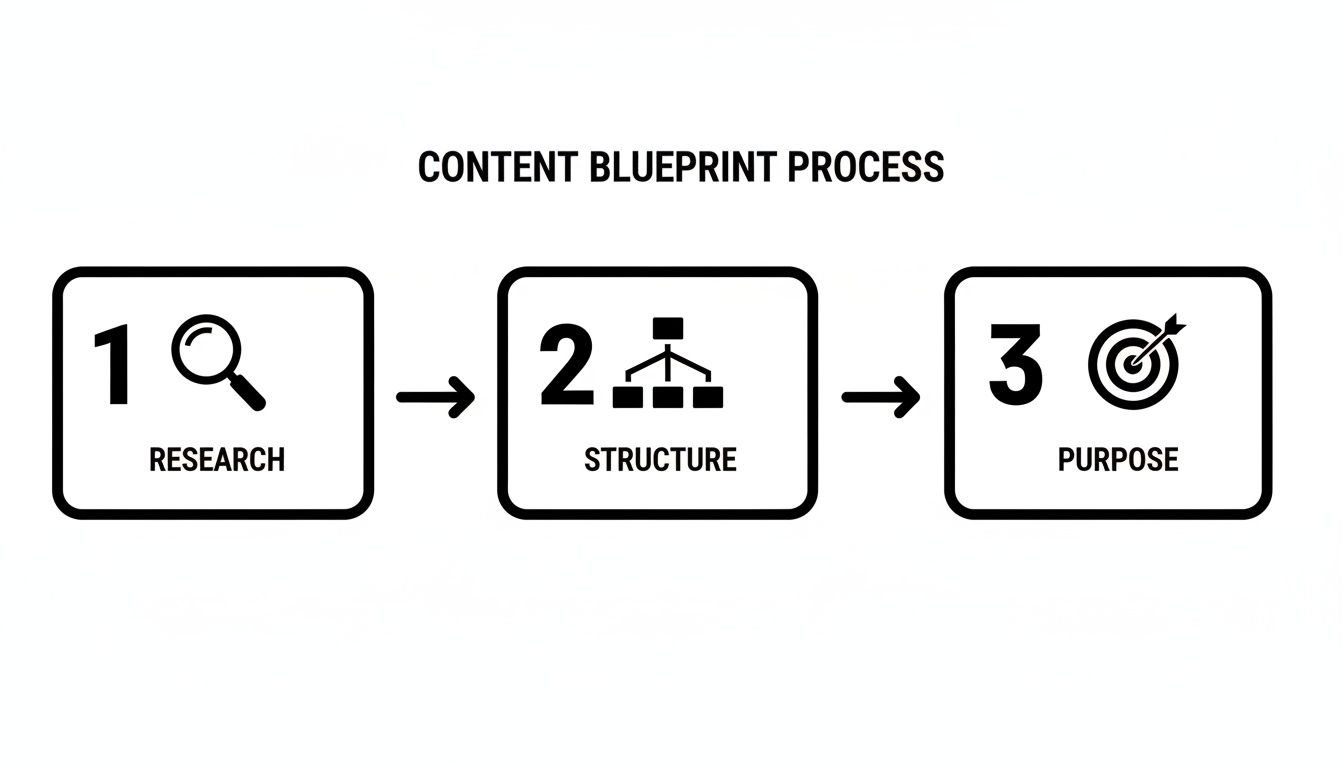
This just shows that solid content starts with knowing your customer, organizing your site with common sense, and giving every single page a clear job to do.
The Three-Second Homepage Test
You have three seconds. That’s it. When someone lands on your homepage, they give you three seconds to convince them to stick around.
Your only job is to get them to stay.
Don’t waste this chance with a wall of text or a weak "Welcome to our website." Get straight to the point with a headline that screams, "Here's the problem I solve."
Here’s a before-and-after example for a plumber:
- Before: “Welcome to Johnson & Sons Plumbing Services”
- After: “Fast, Reliable Plumbing Repairs in Austin. Get Your Free Quote Today.”
The “after” version wins every time. It immediately tells the visitor what you do (plumbing repairs), where you do it (Austin), and why they should care (fast, reliable). Then, it tells them exactly what to do next. That's a homepage that gets calls.
Your About Page Is Not About You
This feels wrong to say, but it's the truth: your About page isn’t really about you. It’s about why your story matters to your customer. People buy from people they feel they know and trust.
Skip the dry company history. Tell a story that connects.
- Share your "why." What problem did you see that made you start this business?
- Show your face. A professional but friendly photo of you or the team is non-negotiable.
- Explain what makes you different. Are you obsessed with quality? Fanatical about customer service? Say it.
A great About page doesn't just list your credentials; it translates them into a benefit for the customer. It’s not "I have 15 years of experience," but "My 15 years of experience means I solve the tough problems fast, saving you stress and money."
See the difference? You’ve turned your resume into a reason for them to trust you.
Translate Services Into Solutions
Your Services pages are where you close the deal. The single biggest mistake I see business owners make is listing features. Nobody cares about features. They care about what those features do for them.
Your job is to translate every feature into a real-world benefit. This is the heart of good sales copy. If you want to go deeper, these copywriting tips for websites are a great place to start.
Here's how to think about it for a house cleaning service:
| Instead of This (Feature) | Write This (Benefit) |
|---|---|
| “We use industry-leading software.” | “Your project gets done right the first time, saving you money on revisions.” |
| “Our vacuums have HEPA filters.” | “We leave your home free of dust and allergens, so your family can breathe easier.” |
By focusing on the "so what," you help the customer picture a better life with your service in it. That’s how you write content that doesn’t just sit there—it sells.
Using AI as Your Writing Assistant
For any busy business owner, the blinking cursor on a blank page is the enemy. This is exactly where AI writing tools become your secret weapon for getting website content done fast.
Think of AI as a very capable assistant, not a replacement for your brain. It can’t share your personal story or your years of hard-won expertise. But it can do the heavy lifting of getting the first draft on the page, saving you hours.
The real trick is learning how to ask for what you need. A generic request like "write a blog post" will get you exactly what you'd expect—generic, useless content. You have to be specific, just like you would with a new hire.
From Blank Page to First Draft in Minutes
The biggest win for a business owner using AI is speed. It can turn that blinking cursor into a solid first draft while you're still on your first cup of coffee.
For instance, don't just give it a topic. Give it a role, a goal, and a customer to talk to.
- Weak Prompt: “Write about my coaching services.”
- Strong Prompt: “You are a marketing expert. Write a 500-word service page for a business coach who helps new entrepreneurs get their first 10 clients. Focus on the pain points of feeling overwhelmed and not knowing where to start. Include a section on building confidence and a clear call to action to book a free discovery call.”
See the difference? This detailed prompt gives the AI the context it needs to create something genuinely useful. Now you have a real draft to work with, not a blank screen.
AI is not a magic button for perfect content. It’s a tool to get you 80% of the way there, faster. Your job is to add the final 20%—your voice, your stories, and your expertise—that makes the content truly yours.
AI for More Than Just Writing
These tools are also brilliant brainstorming partners, especially when you're short on time and fresh out of ideas.
You can use simple commands to get the ball rolling:
- "List 10 blog post topics for a local bakery's website targeting new parents looking for custom birthday cakes."
- "Create a simple outline for an 'About Us' page for a family-owned roofing company with over 20 years of experience."
- "What are five common questions customers have before hiring a realtor? Turn them into headlines."
This isn't a niche trick; it's happening at a massive scale. Industry analysis shows that nearly 94% of marketers plan to use AI for creating blog posts by 2026. For busy owners, the appeal is obvious: it can cut long-form writing time by 30-40%.
Your goal is to treat AI like a collaborator. Let it handle the grunt work so you can focus on the insights and experience that only you can provide. If you're curious about which tools are leading the pack, check out our review of the best AI content generators.
Optimizing Your Content for Search Engines (Simplified SEO)
You’ve written some great content. Now what? If potential customers can’t find it, it might as well not exist.
The good news is that getting your website noticed by search engines like Google isn't some dark art. It’s called Search Engine Optimization, or SEO, and it’s more about clarity than complexity.
Think of it this way: you’re just making it incredibly easy for Google to understand what your page is about so it can confidently show it to someone with a problem you solve. This isn't about tricking Google. It's about being direct and helpful.
This section gives you a simple, non-technical checklist you can use for every single page.
The Basic SEO Checklist
For every page you publish, just run through these quick checks. Most modern website builders, like WordPress with a theme like Astra, give you simple fields to plug this info into. No code needed.
- Keyword in Your Title: The main phrase for the page (e.g., "emergency plumbing repair") should be in your main H1 heading.
- Keywords in Subheadings: Sprinkle your keyword and a few related phrases into your subheadings. Only where it sounds natural.
- Natural Keyword Use: Include your keyword a few times in the main text. Read it out loud—if it sounds robotic or forced, you've gone too far.
- Image "Alt Text": Every image needs a simple, descriptive label (called "alt text"). This tells search engines what the image shows and is crucial for visually impaired users. For example, alt text for a picture of a newly installed roof could be "new asphalt shingle roof on a suburban home."
That's it. These four steps give search engines a clear picture of your page's topic.
Your 30-Second Pitch on Google
When you search on Google, you see a list of blue links and short descriptions. That's your meta title and meta description. Think of this as your 30-second pitch to earn a click over your competitor.
It’s the first impression you make before anyone even lands on your site.
Your meta title is the single most important piece of SEO real estate on your page. It should be clear, compelling, and include your primary keyword, ideally near the beginning.
Here’s a simple, proven formula for a roofer’s service page:
Meta Title Formula: [Main Service] in [Your City] | [Your Business Name]
Example: "Metal Roof Repair in Austin | TX Roofing Pros"
Meta Description Formula: [What you do] for [who you help]. [Benefit 1], [Benefit 2]. [Call to Action].
Example: "We offer fast metal roof repairs for Austin homeowners. Stop leaks, prevent damage, and protect your home. Get a free inspection today."
This combination tells a searcher exactly what you do, where you do it, and why they should choose you.
Don't Forget the Call to Action
Finally, every page must have a purpose. A page that informs but doesn't ask the reader to do something is an SEO dead end.
A clear Call to Action (CTA) gives your visitor the next step, whether it’s "Get a Quote," "Book a Call," or "Download the Guide." When someone takes that action, it sends a powerful signal to Google that your page was helpful. These are called conversions, and they’re a huge indicator of valuable content for a website.
A strong CTA isn't just good for business—it's great for SEO.
Your Questions About Website Content Answered
As a business owner, you've got questions about creating content for your website. You don't need more theory—you need straight answers you can use right now to get unstuck and move forward.
Here are the most common questions I hear, along with some no-nonsense advice.
How Often Should I Add New Content to My Website?
Don't worry about quantity. Focus on quality, starting with your most important pages: your Homepage, About page, and Services pages. These are the workhorses of your site—get them right first.
Once those are solid, adding one high-quality blog post a month is a great, realistic goal for most small businesses. It shows Google your site is active and gives visitors a reason to come back.
Remember, one genuinely helpful article that solves a real customer problem is worth more than four rushed, generic posts. Consistency is what matters. A steady pace wins every time.
Should I Write for People or for Google?
Always, always write for people first. Your real goal is to connect with a potential customer, answer their question, and build enough trust that they decide to call you.
If a human finds your content boring, confusing, or unhelpful, they’ll leave. Google is smart enough to notice that behavior and will conclude your page isn’t a good result.
The good news? The best way to please Google today is to make your human visitors happy.
Here’s how to think about it:
- Write for your customer: Create the most helpful, clear, and engaging content possible.
- Optimize for Google: Then, use the simple SEO checklist we covered as a final polish. This helps Google understand the value you’ve already created.
Good writing for humans is the foundation of good SEO.
Can I Use AI to Write All My Website Content?
You can, but you shouldn't. AI is a fantastic assistant. It can brainstorm ideas, create outlines, and write first drafts in minutes, saving you a ton of time. But it can't replicate your experience, your voice, or the real-world stories that build trust.
The best approach is a partnership. Let AI do the heavy lifting for the first 70-80% of the work. You then step in for the crucial final 20-30%.
That last step is where you turn generic content into something that actually works:
- Add your own hard-won expertise and lessons learned.
- Weave in personal stories or specific customer examples.
- Fact-check everything and refine the tone until it sounds like you.
This gives you the speed of AI without losing the authenticity that actually wins customers.
Does My Website Design Matter More Than the Content?
They're partners, but content does the selling. A great design makes your business look professional and credible—it’s essential for making a good first impression.
But it’s the words on the page—the content for your website—that must convince a visitor you can solve their problem. A beautiful site with weak, unconvincing copy won't get you leads. On the other hand, a simple, clean website with powerful, persuasive content can be a lead-generating machine.
Focus on getting your message right first. A clean, simple design that makes your content easy to read is all you need to start. You can always invest in a fancier design later as your business grows.
Ready to stop guessing and start building a website that works for you? At ReadyWeb AI, we give you the tools and guidance to create effective website content without the technical headaches. Learn how our platform can help you launch a professional site that gets results. Find out more at https://blog.readywebai.com.