Your website should be your hardest-working employee, bringing in qualified leads 24/7. But for many contractors, it’s just an online brochure that gathers digital dust. If your site isn't actively generating calls, quote requests, and new projects, it’s time for a change. This guide is for busy business owners, not tech experts. We're skipping the jargon and focusing on what works.
By the end of this article, you’ll know exactly what makes a contractor website successful and how to use these ideas to turn your own site into a lead-generating machine—often without rebuilding the whole thing. We will break down real-world contractor website examples to show you what top-performing sites are doing right, so you can copy their strategies to get more calls and quote requests.
We’ve gathered a list of high-quality designs and templates from platforms like WordPress, Wix, and Houzz Pro. Each example includes screenshots, links, and a simple breakdown of its key features. More importantly, we provide actionable tips for adding these successful elements to your own site, saving you time and headaches. Let's get started.
1. ThemeForest (Envato)
ThemeForest isn't a single website but a huge online store for website templates, making it a great place to find high-quality contractor website examples. Instead of searching the web for inspiration, you can browse hundreds of professionally designed, ready-to-use WordPress themes built specifically for construction companies, electricians, plumbers, and remodelers.
Think of it as a gallery of potential futures for your website. Each theme includes a "Live Preview" feature, allowing you to click through a fully functional demo site. This is invaluable for seeing how things like project portfolios, service pages, and quote request forms actually work before you buy.
Strategic Breakdown
- See What Your Competition is Doing: You can quickly compare different design ideas side-by-side. See how various themes handle menus, "Get a Quote" buttons, and showcasing project photos. This helps you figure out what you like and what fits your business before you commit to a design.
- Get Pre-Built Tools: Many themes come with essential contractor tools already built-in, like cost calculators, team member pages, and customer testimonial sliders. This saves you from having to find and install separate add-ons (plugins) later.
- Check for Quality: Pay close attention to the details on each theme's page. Look for themes with recent updates, high star ratings, and a large number of sales. This shows that the developer is reliable and keeps their product up-to-date.
Actionable Takeaways
When browsing ThemeForest, use the filters on the side of the page to your advantage. You can sort by which "page builder" tool it uses (like Elementor), features, and recent updates to narrow down the options.
Pro Tip: Ignore outdated themes. A theme that hasn't been updated in over six months could be a security risk or might not work with the latest version of WordPress. Always check the "Last Updated" date.
While browsing these pre-built themes gives you a fantastic head start on design, it's also a great way to understand the potential investment required. To learn more about how a premium theme fits into your budget, you can explore the factors that influence the total cost of a small business website.
Website: themeforest.net
2. TemplateMonster
Similar to ThemeForest, TemplateMonster is a large marketplace offering hundreds of professionally designed templates. The main difference is that it offers more variety. While many marketplaces focus almost exclusively on WordPress, TemplateMonster provides high-quality themes for different systems, including simple HTML sites, Shopify, and others. This makes it a great resource if your business website isn't built on WordPress.
The platform lets you explore contractor website examples across different technologies in one place. Each template includes a live demo, user ratings, sales numbers, and a clear list of features, which makes it easier to find a design that fits your needs and business goals.
Strategic Breakdown
- Inspiration for Any Platform: You can see how great designs look on Shopify or as simple HTML sites, not just WordPress. This is useful for understanding how different platforms handle features like project galleries and "request a quote" forms.
- Easy to Judge Quality: The platform's standard layout for each template helps you quickly compare options. Look for templates with recent updates, good customer ratings, and helpful author support. This is crucial for avoiding old or poorly made products.
- Find the Right Features Fast: TemplateMonster's filters let you search by website system, price, features, and user rating. This helps you quickly find templates that already include essential tools like appointment booking or cost estimators.
Actionable Takeaways
When looking at templates, pay close attention to the support offered. TemplateMonster has its own 24/7 chat support, but the theme's creator also provides help. Check the creator's support policy to understand what to expect if you run into trouble.
Pro Tip: Because there are so many templates, quality can vary. Use the "Sort by" filter and choose "Newest" or "Top-rated" to see the most modern and reliable themes first. This helps you avoid older options that might not be supported anymore.
The variety at TemplateMonster is a reminder that your website's foundation matters. If you're still deciding on the best platform for your business, understanding the different options can help you make a better choice that balances cost, features, and ease of use.
Website: templatemonster.com
3. Wix (Industrial/Construction Templates)
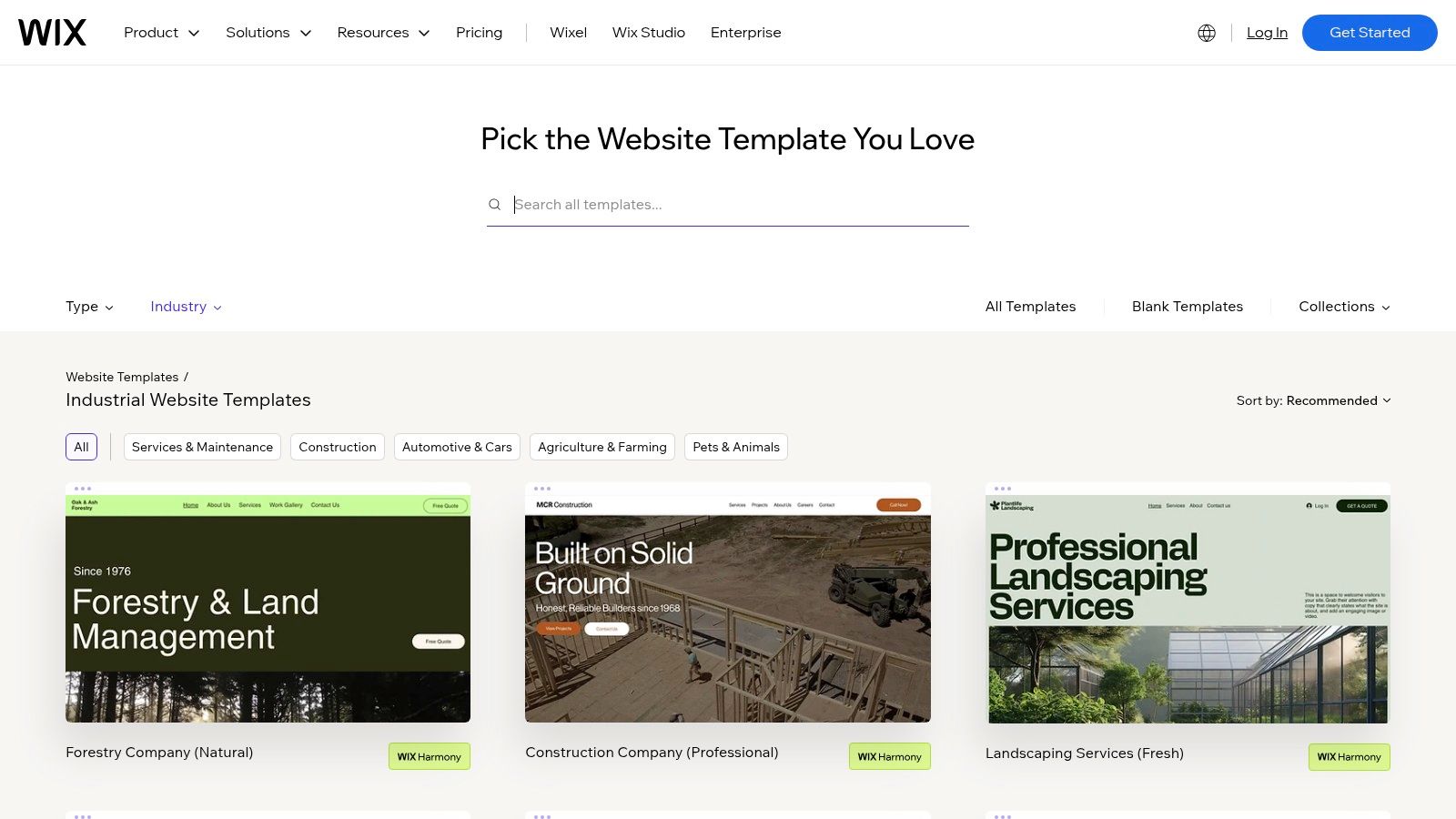
Wix is an all-in-one platform perfect for contractors who need a professional website launched quickly without writing any code. Its collection of industrial and construction-themed templates gives you a complete starting point, including pre-built pages for services, project galleries, and contact forms. This makes getting online much easier for non-technical business owners.
Instead of starting with a blank page, you can pick a template that matches your business style and use the simple drag-and-drop editor to add your logo, colors, text, and images. The platform includes hosting (where your site lives online), security (SSL), and a domain name in its plans, simplifying the entire setup process.
Strategic Breakdown
- Get Online Fast: The biggest advantage is speed. You can pick a template and have a live, working website in just a few hours. This is a huge benefit for contractors who need an online presence immediately to bid on jobs or build credibility.
- Add Features Easily: The Wix App Market lets you add tools like online booking for consultations, live chat for instant customer support, and lead management systems directly to your site without needing complex technical help.
- Simple to Use: Wix is designed for beginners. The visual editor shows you exactly what your site will look like as you build it. This removes the guesswork and frustration that can come with more technical platforms like WordPress.
Actionable Takeaways
Start by exploring the "Construction Company" and "Civil Engineering" templates to see different layouts for service pages and project portfolios. Pay attention to how they guide visitors toward a "Request a Quote" form, as this is the most important goal for any contractor website example. For a direct solution, consider a specialized Construction Website Wix Studio Template designed specifically for your industry.
Pro Tip: Use the built-in Wix SEO Wiz. This guided tool walks you through the basic steps of setting up your site to be found on Google, helping you get seen by local customers.
While Wix makes setup easy, knowing what makes a good website is still important. To ensure your new site has all the right parts, you can learn more about building a professional website for contractors and apply those principles within the Wix editor.
Website: wix.com/website/templates/html/industrial
4. Webflow Templates Marketplace
Webflow's official marketplace offers a hand-picked selection of high-quality templates that are a step up in design and performance. Unlike giant marketplaces, every template here is reviewed by Webflow to ensure it has clean code, works well on phones, and uses modern design. This makes it a great source for contractors looking for premium contractor website examples that feel like they were custom-built.
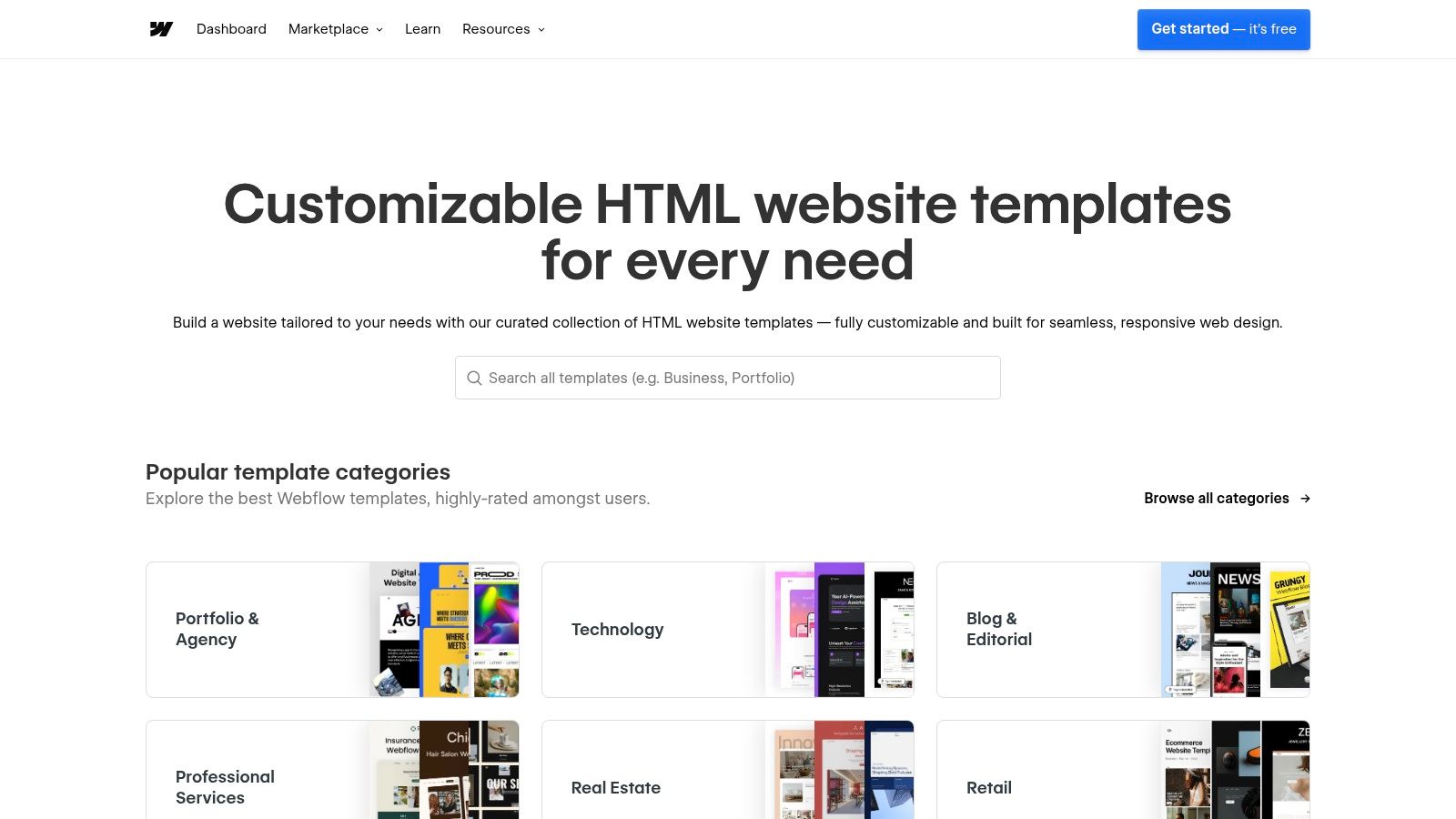
The platform gives you more creative control without needing to write code. Many templates come with a pre-built Content Management System (CMS) for your projects, services, and team members, which makes it easy to update your content. The "Live Preview" lets you interact with the full site, including animations and unique layouts.
Strategic Breakdown
- Built for Performance: Webflow templates are known for loading fast and looking great, which can help your site rank better on Google. This is critical when potential clients are browsing on their phones from a job site.
- Free "Cloneable" Projects: The "Made in Webflow" gallery shows off real websites, and many designers offer "cloneable" versions. This allows you to copy an entire pre-built project into your own account for free, giving you a powerful starting point to customize.
- Everything Works Together: Templates often include beautifully integrated features like a CMS for your portfolio, e-commerce for selling service packages, and polished contact forms. Some even come with the original design files (Figma), which is a huge bonus if you're working with a designer.
Actionable Takeaways
When exploring the marketplace, use the filters to search for templates specific to "Construction" or "Architecture." Pay close attention to the template's details page, where you can read reviews, check the support policy, and see the included style guide.
Pro Tip: Webflow can be more complex to learn than Wix, but its visual editor is incredibly powerful. Before buying a template, try building a simple page using a free Webflow account to see if it’s a good fit for you.
The higher initial cost of a Webflow template often pays for itself with a faster, more secure, and higher-performing final website. This focus on quality and control makes it an excellent platform for contractors who see their website as a critical business asset.
Website: templates.webflow.com
5. WordPress.org Theme Directory
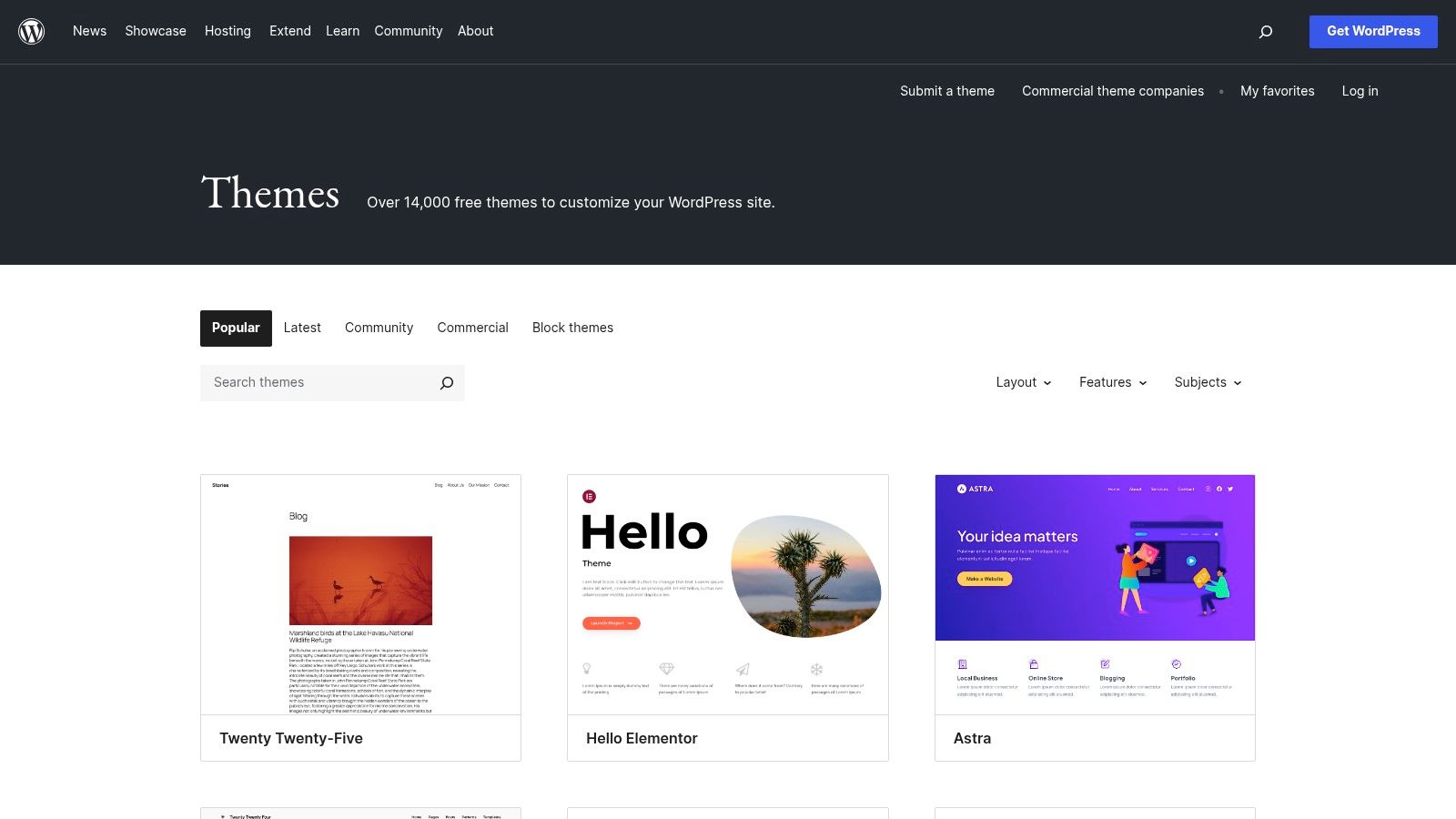
The official WordPress.org Theme Directory is the best starting point for anyone building a website on a tight budget. It's a massive, searchable library of free themes, including many designed for contractors, construction firms, and home service businesses. This makes it an ideal place to find functional contractor website examples without any upfront cost.
Unlike premium marketplaces, every theme here is open-source and checked by the WordPress team for basic quality and security. This allows you to safely install and test multiple designs directly from your WordPress dashboard, giving you a hands-on feel for different layouts for your services, projects, and contact pages.
Strategic Breakdown
- Try Before You Commit: Since the themes are free, you can experiment with different styles to see what works for your business. Install a few, add your logo and some sample text, and see how they feel before deciding on a final design.
- A Solid Foundation: Free themes often provide the essential pages you need: a homepage, an about page, a services section, and a contact form. They are built to work well with popular add-ons (plugins) for things like quote forms.
- Option to Upgrade: Many free themes are "lite" versions of a more powerful premium theme. This allows you to start for free and only pay to upgrade if you decide you need more advanced features, like a cost calculator or fancy portfolio filters.
Actionable Takeaways
When searching the directory, use keywords like "construction," "handyman," "plumbing," or "contractor." Once you find a theme you like, check its details page for three key things: Last Updated, Active Installations, and Ratings. A recently updated theme with lots of users and good reviews is a much safer bet.
Pro Tip: Look for themes that clearly state they are "block-based" or fully compatible with the Block Editor (also called Gutenberg). These modern themes are more flexible and easier to customize without needing to know code, which is a major advantage when choosing the best website for small business owners.
Website: wordpress.org/themes/
6. Houzz Pro
Houzz Pro offers something different: a website service that's bundled with an all-in-one project management platform. It's designed for contractors who want more than just a website; they want a connected system that links their online presence directly to their business operations, from getting a new lead to sending the final invoice.
Instead of having you build it yourself, Houzz Pro offers a ready-made website solution built by their team. This service is an add-on to their main software, which includes tools for estimates, invoicing, and client communication. For a busy contractor, this is a way to get a professional website without the steep learning curve of building one from scratch.
Strategic Breakdown
- Everything in One Place: The biggest advantage is that the website works perfectly with their other tools. When someone fills out a lead form, it can automatically create a new client profile in your system, saving you time on manual data entry.
- Made for Your Industry: Websites built through Houzz Pro are designed with contractors in mind. They often include built-in features like project galleries linked to your Houzz profile, review widgets, and clear buttons that guide visitors to request an estimate.
- More Visibility: A key benefit is the connection to the massive Houzz directory. Having a professional site linked to a well-managed Houzz profile can significantly boost your chances of being found by homeowners actively looking for contractors.
Actionable Takeaways
Houzz Pro is best for contractors who already use or plan to use the Houzz platform to get leads. It trades the design freedom of a WordPress site for the convenience of a system where everything works together automatically.
Pro Tip: Before signing up, ask to see examples of websites they have recently built for businesses like yours. Check the design, how it looks on a phone, and how fast it loads to make sure the quality meets your standards, as you will have less control over the final product.
While the service offers an all-in-one solution, it costs more than a simple template. Make sure you understand how their marketing and website packages will directly help you get more leads to see if it's worth the investment.
Website: houzz.com/houzz-pro/pricing
7. Etsy (Squarespace Contractor Templates)
You might know Etsy for handmade crafts, but it's also a great marketplace for digital products, including premium Squarespace templates. This makes it a hidden gem for finding unique contractor website examples that aren't on WordPress. Independent designers create and sell ready-to-install Squarespace templates made for builders, remodelers, and other home service pros.
Instead of starting from scratch, you can buy a professionally designed template that the seller often installs directly into your Squarespace account for you. Most listings include a live demo site, so you can see exactly how the design, pages, and user experience will look. This is perfect for contractors who prefer the simplicity of Squarespace over WordPress.
Strategic Breakdown
- Unique, Modern Designs: Etsy designers often have a distinct style that stands out from generic corporate templates. You can find designs with a more high-end feel, which is ideal for contractors who work on premium residential projects.
- Simple Setup: Many sellers offer to transfer the completed template directly to you within 24-48 hours. This service eliminates the technical setup, allowing you to focus immediately on adding your own photos, text, and business information.
- Comes with the Right Pages: Good templates on Etsy come with pre-built pages that every contractor needs, like Services, Portfolio/Projects, About Us, and a detailed contact form. This gives you a clear structure for your website's content from day one.
Actionable Takeaways
When searching on Etsy, carefully read the seller's reviews, item details, and policies. Look for information on what's included, how the installation works, and what kind of support is offered after your purchase. Many sellers also provide helpful checklists and video tutorials.
Pro Tip: Check out the seller, not just the template. Look at their sales history, star rating, and what other customers have said. A good seller will have a history of responding quickly and providing the help you need to get your site online.
The one-time cost for a premium Squarespace template on Etsy is often much more affordable than a custom design project. It gives you a professional, polished look quickly, making it a great option for contractors who need a high-quality site without the complexity of coding.
Website: etsy.com/market/squarespace_template_contractor
Top 7 Contractor Website Template Comparison
| Option | Complexity 🔄 | Resources & Cost ⚡ | Quality / Impact ⭐📊 | Ideal Use Cases 💡 | Key Advantages |
|---|---|---|---|---|---|
| ThemeForest (Envato) | 🔄 Medium — vet authors & demos | ⚡ Moderate — one-time theme fees; dev time to trim bloated themes | ⭐⭐⭐⭐ 📊 Variable-high — many high-quality themes, quality varies by author | 💡 Teams or DIY builders who want many stylistic options and comparisons | Large selection; transparent metrics (updates, ratings); contractor-specific pages |
| TemplateMonster | 🔄 Medium — browse multiple CMS options | ⚡ Moderate — item fees; cross-platform choices may increase setup work | ⭐⭐⭐ 📊 Good — consistent listings but variable age/quality | 💡 Projects needing non‑WordPress options (Shopify, HTML, Joomla) | Cross-platform catalog; consistent listing structure; 24/7 support |
| Wix (Industrial/Construction Templates) | 🔄 Low — drag‑and‑drop, one-click edit | ⚡ Low — hosting/SSL/apps included; some paid apps may be needed | ⭐⭐⭐ 📊 Good for quick launches; limited portability | 💡 Non-technical users needing a fast, hosted contractor site | Fast setup; hosting & SSL included; built-in apps (bookings, CRM) |
| Webflow Templates Marketplace | 🔄 Medium–High — learning curve for Designer & CMS | ⚡ Higher — premium template cost + learning investment | ⭐⭐⭐⭐ 📊 High — clean code, interactions, strong SEO/performance | 💡 Designers/teams prioritizing performance, modern interactions, CMS control | Clean modern builds; CMS + Figma files; cloneables and marketplace vetting |
| WordPress.org Theme Directory | 🔄 Low — 1‑click install, standard reviews | ⚡ Low — free themes; optional paid pro upgrades | ⭐⭐⭐ 📊 Reliable baseline — lighter feature depth than premium | 💡 Budget-conscious builds or experimentation/testing | Free and open source; easy to try multiple themes; visible compatibility data |
| Houzz Pro | 🔄 Low (turnkey) — vendor-managed site + tools | ⚡ High — subscription/marketing costs; turnkey setup time | ⭐⭐⭐⭐ 📊 High potential for leads but mixed ROI reports | 💡 Contractors who want full-service website + lead generation without DIY | All-in-one stack (CRM, invoicing, website); integrations; U.S. directory exposure |
| Etsy (Squarespace Contractor Templates) | 🔄 Low — seller installs/transfers to Squarespace | ⚡ Low — affordable one-time templates; seller-dependent support | ⭐⭐⭐ 📊 Variable — fast delivery but quality varies by seller | 💡 Fast, inexpensive Squarespace launches with industry copy blocks | Affordable one-time pricing; quick transfer/setup; industry-specific sections |
Your Next Step: Turn These Examples Into Your Reality
We've explored a powerful lineup of contractor website examples, each one a blueprint for attracting better clients and growing your business. From the professional look of Webflow templates to the all-in-one solutions from Houzz Pro, a clear pattern emerges: a successful website is your hardest-working employee. It builds trust before you even shake a hand and answers a potential customer’s biggest questions instantly.
The key isn't to copy these sites exactly, but to steal the strategies behind them. Notice how the best examples use crystal-clear buttons like "Get a Free Estimate" and feature high-quality photos of their actual work, not just stock images. They make it incredibly easy for visitors to find their phone number, service areas, and proof of their expertise through testimonials and project galleries.
Making the Right Choice for Your Business
Now, it's time to take action. The right path forward depends on your budget, your comfort with technology, and how much time you can dedicate to the project.
- For Total Beginners (Low-Tech, Fast Results): Platforms like Wix or buying a pre-made Squarespace template from Etsy are your best bet. They remove the technical guesswork with drag-and-drop editors, letting you focus on adding your photos and business details to a professional-looking design.
- For DIY-ers Seeking Control (Some Tech Skill): WordPress, paired with a premium theme from ThemeForest or TemplateMonster, offers a great balance of power and usability. You get endless customization options and the ability to add powerful features with plugins, giving you a site that can grow with your business.
- For Industry-Specific Solutions: If you're in a specialized trade like HVAC or home remodeling, a platform like Houzz Pro is designed just for you, integrating project management and lead generation tools directly into your site. To see more examples for your trade, you can discover the best HVAC websites and platforms for digital marketing.
Your Action Plan
Don't get stuck overthinking it. Your goal is to get a professional, lead-generating website online, not to build the perfect one on the first try. Start by choosing a platform from the list above that matches your skill level and budget. Then, gather your essential materials: your best project photos, customer testimonials, and a clear list of the services you offer.
Remember, the most effective contractor websites are simple, trustworthy, and built to turn visitors into paying customers. The examples we've reviewed prove you don’t need a massive budget or a web development degree to create a powerful online presence. You just need a clear plan and the right tools to bring it to life.
Ready to attract more clients with great content? The ReadyWeb AI Blog helps you publish expert articles and local SEO content in minutes, turning your new website into a true lead-generation machine. Visit the ReadyWeb AI Blog to learn how AI can handle your marketing, so you can focus on your craft.