Feeling buried in software options? This guide is your simple map. By the end of this article, you’ll know exactly how to pick the right email marketing software for your small business—and get it working in under an hour, no tech degree required.
Imagine your local bakery sends one email about a flash sale and sells out of croissants before lunch. Or a contractor books three new jobs from a single, well-timed message. That’s the power we’ll help you find.
How to Choose Your Email Marketing Software
We’re cutting through the noise to show you which features actually matter, what to expect on price, and how to get going fast. No jargon, just real examples.
Think of email marketing software as your digital megaphone. It’s a tool that lets you talk to all your customers at once, saving you from sending emails one by one from your personal Gmail or Outlook account.
Why You Can’t Just Use Gmail or Outlook
Your personal email is perfect for one-on-one conversations. But it hits a wall fast when you need to reach hundreds of people. Sending mass emails from a regular inbox is a quick way to get your messages flagged as spam—meaning your customers will never see them.
Email marketing software is built for this job. It makes sure your emails get delivered, helps them look professional, and tells you who opened them and what links they clicked.
The Big Idea: The point isn’t just to send emails. It’s to build relationships that drive sales. The right software turns your customer list into a reliable source of revenue, simply and effectively.
Picking the right platform is your first big step. With options ranging from free to hundreds of dollars a month, it’s easy to get overwhelmed. This guide breaks it down so you can find the best fit for your business and budget. As you explore, it’s also worth seeing how new AI tools for digital marketing can make your work even easier.
Why Email Marketing Is Your Secret Weapon for Growth
Let’s change how you think about email. It’s not about blasting out messages; it’s about building real relationships that quietly drive sales in the background. For a small business owner, this is one of the most affordable and effective ways to grow.
Think of it like having a direct line to your best customers—something a noisy social media feed can never offer. While a Facebook post gets buried in minutes, an email lands right in their personal inbox. You own this connection, giving you a reliable way to stay top-of-mind and build loyalty.
Turn Relationships Into Revenue
The real magic of email marketing software for a small business is the incredible return it generates. It’s how you can compete with bigger companies without needing their budget. For a busy owner, this means less time chasing leads and more time running your business.
The numbers don’t lie. On average, email marketing brings in $36 for every $1 spent. For a retail or online store, that number can jump to $45 per dollar. It’s a low-cost, high-return system for creating predictable growth.
Key Takeaway: Stop thinking of email as just a newsletter. It’s a system for turning your customer list into a reliable source of income.
From First Contact to Loyal Customer
Good email marketing turns a curious website visitor into a happy, paying customer—often automatically. Picture this: someone lands on your site but isn’t ready to buy. Instead of losing them forever, an email signup form captures their interest so you can follow up. It’s a game-changer for learning how to improve website leads without extra work.
Here’s what that looks like in the real world:
- Before: A plumber hopes past clients remember him when a pipe bursts.
- After: The plumber sends a “Winter Prep Checklist” email. When a pipe freezes two months later, he’s the first person they call.
- Before: A local cafe hopes customers stop by again soon.
- After: The cafe automatically sends a “We miss you!” coupon to anyone who hasn’t visited in 60 days, bringing them back in.
Of course, to make this work, you need a customer list. That starts with building an email list—the first step in creating a valuable business asset that works for you 24/7.
The Core Features Every Small Business Actually Needs
Shopping for email marketing software for a small business is like walking into a massive hardware store. You see endless aisles of specialized tools, but you really just need a good hammer, a screwdriver, and a tape measure.
You don’t need the most complex platform to get results. Focus on these three essentials to avoid overpaying for features you’ll never use.
1. A No-Fuss Email Builder
You need a way to create clean, professional-looking emails without a design degree. Look for a drag-and-drop editor.
Think of it like building with LEGOs. You grab a “block”—a text box, an image, a button—and drop it where you want it. This lets you put together a sharp-looking email for a flash sale or a new service announcement in minutes, not hours.
2. Simple Contact Management (Your “Smart” Address Book)
Your email list is one of your most valuable business assets. Contact management is simply how you keep that list organized.
A good system lets you use tags (like digital sticky notes) to group your customers. For example, a local bakery could tag people who bought a gluten-free cake. This way, when they bake a new gluten-free item, they can send an email only to the people who are most likely to buy it.
Key Idea: Stop sending the same generic email to everyone. A targeted message to a small, interested group will always outperform a blast to your entire list.
3. A “Set-It-and-Forget-It” Welcome Email
Automation sounds complicated, but for a small business, it starts with one simple but powerful move: an automatic welcome email.
This is your digital handshake. When someone joins your list, the software instantly sends a pre-written message for you. It can be a simple “Thanks for joining!”, a 10% discount on their first order, or a link to a helpful guide. This one feature works for you 24/7, making a great first impression without you lifting a finger.
The diagram below shows how these simple features build on each other, creating a ladder from basic contact to sustainable growth.
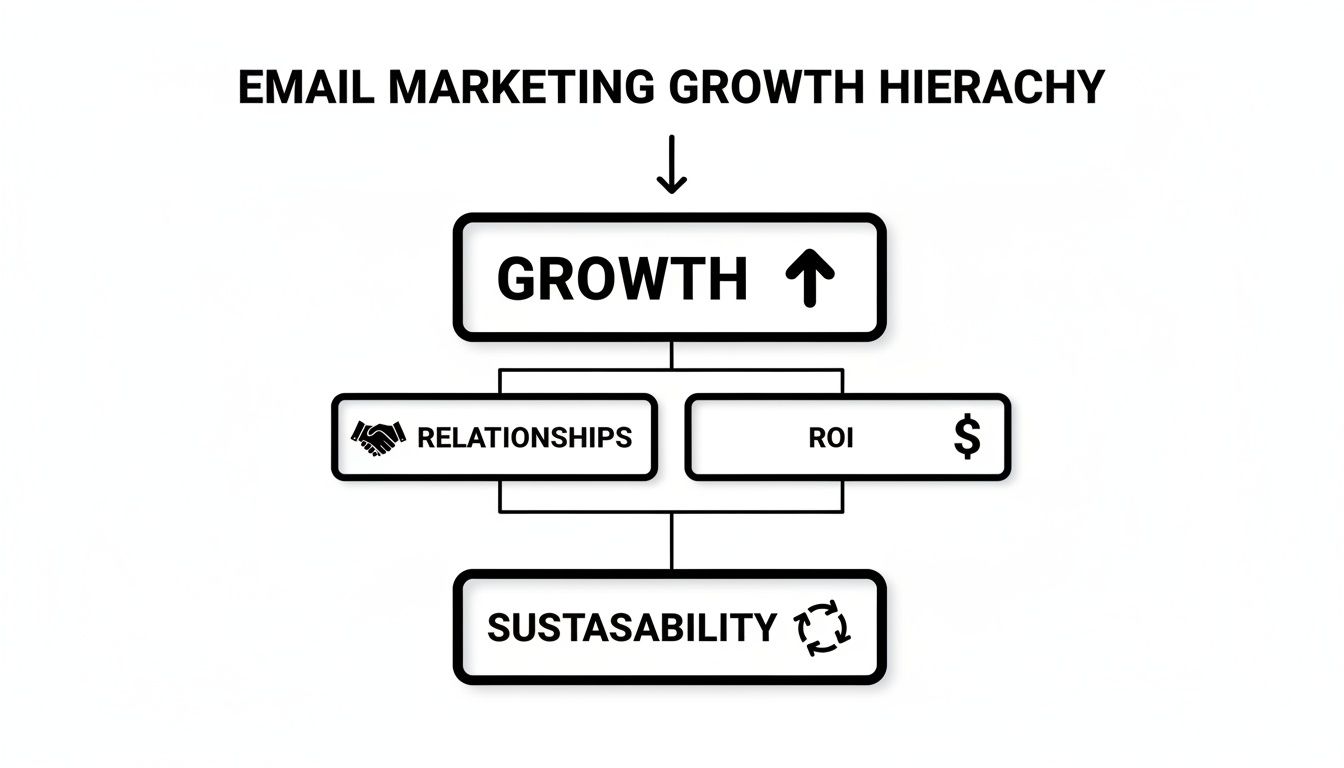
As you can see, it all starts with building real relationships. That connection is what drives a powerful return on your time and money. By mastering these three core features, you have everything you need to turn your email list into an engine for sales.
How to Find the Right Software for Your Budget
Alright, let’s talk about the price. When you’re looking at email marketing software, the costs can feel all over the place—from free to hundreds of dollars a month.
The trick isn’t finding the cheapest option. It’s understanding how these tools charge so you can pick one that grows with you, not against you. That way, you won’t get hit with a surprise bill right when things start taking off.
As you compare platforms, you’ll see a few different software pricing options, but they all boil down to a couple of simple models.
Decoding the Price Tiers
You’re going to run into three main ways companies bill for their services.
Here are the models you’ll see most often:
- Free Plans: Perfect for getting started. They are genuinely free but have limits, like how many people you can email (your “subscribers”) or how many emails you can send each month. It’s a no-risk way to test the waters.
- Per-Subscriber Tiers: This is the most common setup. You pay a flat monthly fee based on the size of your email list. For example: $15/month for up to 500 subscribers, then $30/month for up to 1,000. It’s designed to scale with your business.
- Pay-As-You-Go: This works like a prepaid phone plan. You buy a block of email “credits” and use them when you need them. This is a fantastic choice if you only send emails occasionally—like for a seasonal sale or an annual event.
What Does “Subscriber” Really Mean?
It’s simpler than it sounds. A subscriber is just one person (one email address) on your contact list. If you have a spreadsheet with 250 customer emails, you have 250 subscribers.
The Bottom Line: Your cost is tied directly to the size of your audience. A photographer with 150 past clients will pay far less than a local store with 2,500 newsletter signups. Start by counting your current contacts to see which tier fits. Many free plans cover up to 500 subscribers, which is a perfect starting point for most small businesses.
Your 5-Step Quick Setup Checklist
Alright, you’ve picked your email marketing software. Now for the fun part—getting it working. This isn’t a dense technical manual. It’s a simple checklist to get you from sign-up to sent in under an hour.

Step 1: Import Your Contacts
Start with the people who already know you. Grab that spreadsheet of customer emails you’ve been collecting—a simple file with “First Name” and “Email Address” columns is all you need. Every platform has a big “Import Contacts” button. Just upload your file.
Step 2: Fill Out Your Business Profile
This step is critical for looking professional and staying out of the spam folder. Your software will ask for your business details. This is required by law for sending marketing emails.
You’ll be asked for:
- Your Business Name: So people know who the email is from.
- A Physical Mailing Address: This goes in the footer of every email to comply with anti-spam laws. A P.O. Box is fine if you don’t have a storefront.
Why This Matters: A complete profile proves to email providers like Gmail that you’re a real business. It’s a huge factor in making sure your emails actually get delivered.
Step 3: Create Your First Email Using a Template
Don’t start from a blank screen. The best email marketing software for a small business is packed with ready-made templates. Go to the “Templates” or “Campaigns” area and find one you like. A “Welcome” or “Announcement” template is a great place to start. Just swap out the placeholder text and images for your own.
Step 4: Ask AI to Help Write the Email
Staring at a blinking cursor? Many modern email tools have a built-in AI assistant. If you’re stuck, give it a simple command like: “Write a short, friendly welcome email for new subscribers. Thank them for joining and offer 10% off their first purchase.” The AI will generate a solid first draft in seconds.
Step 5: Send a Test, Then Hit Send
Before you send it to your whole list, send a “test email” to yourself. Open it on your phone and your computer. Check for typos and make sure any links work. Once it looks good, it’s time for the real thing. Hit that ‘Send’ button. Congratulations—you’re officially an email marketer.
Common Mistakes to Avoid (And How to Fix Them)
Jumping into email marketing is exciting, but a few common missteps can kill your momentum. By avoiding these, you’ll build a list that actually wants to hear from you.
The biggest mistake? Buying an email list. It feels like a shortcut, but it’s a guaranteed way to land in spam folders, damage your reputation with customers, and even get your account shut down.
Sending Emails Without a Goal
Another common error is sending emails just for the sake of it. Every message needs a job. Are you trying to sell a product? Book appointments? Share a helpful tip? Without a clear goal, your emails feel random, and people will tune them out. Before you hit send, ask yourself: what do I want the reader to do after opening this?
Before: A contractor sends a generic monthly newsletter with random project photos. It gets a 2% click rate and zero new leads.
After: The same contractor sends a targeted email to past clients offering a “Gutter Cleaning Special” before the rainy season. This gets a 22% click rate and books four new jobs in the first week.
Ignoring Your Reports
Your email software gives you simple reports for a reason: they tell you what’s working. Ignoring numbers like open rates (who opened it) and click-through rates (who clicked a link) is like driving with your eyes closed. A quick look can tell you a story. A high open rate but a low click rate? Your subject line worked, but the message inside didn’t convince them to act. Small tweaks, like to an email header example, can make a huge difference.
Your Questions, Answered
Let’s tackle the most common questions we hear from small business owners.
Can I Really Start Email Marketing for Free?
Yes, absolutely. Nearly all the best email marketing software for a small business offers a “freemium” plan. They give you the core tools to get started without a credit card.
These free plans usually have limits. For example, a typical free plan might let you have up to 500 subscribers and send 2,500 emails a month—more than enough for most businesses just starting out.
So, What’s the Catch with a Free Plan?
There’s no real “catch,” just a few trade-offs. Think of it as a starter kit.
Here’s what you can expect:
- Their Logo on Your Emails: Your emails will likely include a small logo from the software company in the footer.
- Simpler Features: You’ll get the basics (like a welcome email), but more advanced tools are usually for paid plans.
- Built-in Limits: Once you hit your subscriber or sending limit, you’ll be prompted to upgrade.
These free plans are a fantastic, no-risk way to learn. The companies bet that as your business grows, you’ll be happy to pay to unlock more power.
How Often Should I Be Sending Emails?
There’s no magic number. The golden rule is to only hit “send” when you have something genuinely valuable to share.
Key Insight: Consistency is more important than frequency. A helpful monthly update will always beat a spammy weekly email that offers nothing new.
Start with a reasonable goal. If you’re a real estate agent, a weekly “new listings” email makes sense. If you run an auto shop, a quarterly service reminder is perfect. Pay attention to your audience—if your unsubscribe rate goes up, you might be sending too often.
If you need a website with E-commerce function visit ReadyWeb AI.
Ready to turn these insights into action? The ReadyWeb AI Blog is your go-to resource for practical tips on building your business online. Explore our guides and start growing today. Find more articles like this at https://blog.readywebai.com.