Putting an online store together is one thing. Getting customers to actually find it is the real challenge.
The secret to winning at ecommerce with the best SEO isn't about some complicated code or marketing mystery. It’s about showing up on Google the moment someone decides they want to buy.
By the end of this guide, you'll have a clear plan to turn your website into a 24/7 salesperson—without needing a marketing degree or a huge ad budget. You'll know how to attract customers who are already looking for what you sell, leading to more sales and fewer headaches.
Why Smart SEO Is Your Best Salesperson
Think of your store’s location. Is it hiding on a digital side street nobody visits, or is it on the busiest shopping avenue in the world? SEO (Search Engine Optimization) is what moves you to that prime real estate. It's the work you do to make your site more attractive to search engines like Google, so they put your products right in front of customers looking for them.
This isn’t about trying to trick Google. It's about being crystal clear about what you sell so the search engine can recommend you with confidence. When you get this right, you get a steady flow of people who are already looking for what you offer. That means less money wasted on ads that may or may not work.
The Power of Being Found Organically
Let's look at a real-world example. Imagine you're a plumber. Someone's pipe just burst, and they search Google for "emergency plumber near me." The plumber who shows up at the top of the search results is going to get that call. SEO is what gets you to the top.
The customers who find you through search are way more likely to buy. They weren't interrupted by an ad—they were actively looking for an answer, and Google told them you have it.
The Before and After:
- Before SEO: You rely on expensive ads and word-of-mouth. Sales are unpredictable.
- After SEO: Your website consistently brings in new customers from Google, creating a reliable stream of sales for your business.
Your best customers are the ones looking for you right now. SEO is how you make sure they find you first, turning their search into your sale.
Building a Long-Term Business Asset
Paid ads are like renting a billboard—the moment you stop paying, your ad disappears. SEO is like buying the billboard. Every bit of work you put in, from writing a great product description to organizing your site, builds on itself. You're creating a sustainable asset that pays off for years.
Here’s a quick comparison to make it clear:
SEO vs. Paid Ads: A Quick Comparison for Your Business
This table breaks down the fundamental differences between investing in SEO and spending on paid ads, helping you understand the long-term value.
| Factor | SEO (Search Engine Optimization) | Paid Ads (e.g., Google Ads) |
|---|---|---|
| Cost | Upfront investment in time/resources; ongoing effort. | Pay-per-click; budget stops, traffic stops. |
| Timeline | Slower to build momentum (months). | Immediate results. |
| Longevity | Creates a lasting asset; traffic is sustainable. | Short-term gains; no long-term value once paused. |
| Trust | Builds high trust and authority with users. | Users know it's an ad; can be seen with skepticism. |
| ROI | High long-term ROI as traffic compounds. | ROI is directly tied to continuous ad spend. |
Ultimately, SEO isn’t just about rankings; it’s about building a healthier, more resilient business.
The core benefits directly feed your bottom line:
- More Sales: You attract shoppers who are already in a buying mindset.
- Reduced Ad Spend: You become less dependent on expensive pay-per-click campaigns.
- Lasting Brand Authority: You become a trusted name in your niche for both customers and Google.
These strategies work hand-in-hand with a strong SEO foundation. If you want to dive deeper, check out these excellent digital marketing tips for small business to round out your approach.
Building Your Store’s Blueprint for Google
Ever walked into a massive store with no signs or clear aisles? It’s frustrating. You’d probably just turn around and leave. That’s exactly what a poorly organized website feels like to both your customers and to Google.
If you want the best ecommerce SEO, you need a simple, logical blueprint for your site. This is about creating a clear path from your homepage to your products so search engines can easily understand what you sell and show it to people who are ready to buy.
A Clear Path to Purchase
A solid site structure usually flows just like a real-world store:
- Homepage: The front door to your shop.
- Categories: The main aisles (e.g., “Men’s,” “Women’s”).
- Sub-Categories: More specific aisles inside the main ones (e.g., “Men’s Running Shoes”).
- Product Pages: The actual products on the shelves.
Think of it as a clean family tree where every page has a clear parent. For an online craft store, that path might look like: Homepage -> Knitting Supplies -> Wool Yarn -> Merino Wool Yarn.
This simple hierarchy makes it a breeze for customers to find what they want, and it’s a massive signal to Google that your site is authoritative and easy to use. You’re turning potential confusion into a direct path to purchase.
Creating URLs That Guide and Inform
Your page URLs—the web addresses—are a surprisingly important part of this blueprint. They need to be clean and descriptive, acting like clear, helpful signs in your store’s aisles.
A Before & After for URLs:
- Messy URL (Before):
yourstore.com/cat?id=482&prd=9910 - Clean URL (After):
yourstore.com/knitting-supplies/merino-wool-yarn
See the difference? The second one tells both people and search engines exactly what they’ll find before they even click. This isn’t a complicated fix, either. Most ecommerce platforms let you customize your URLs to make them readable.
This simple diagram shows how a solid SEO foundation, starting with good site structure, fuels real business growth.
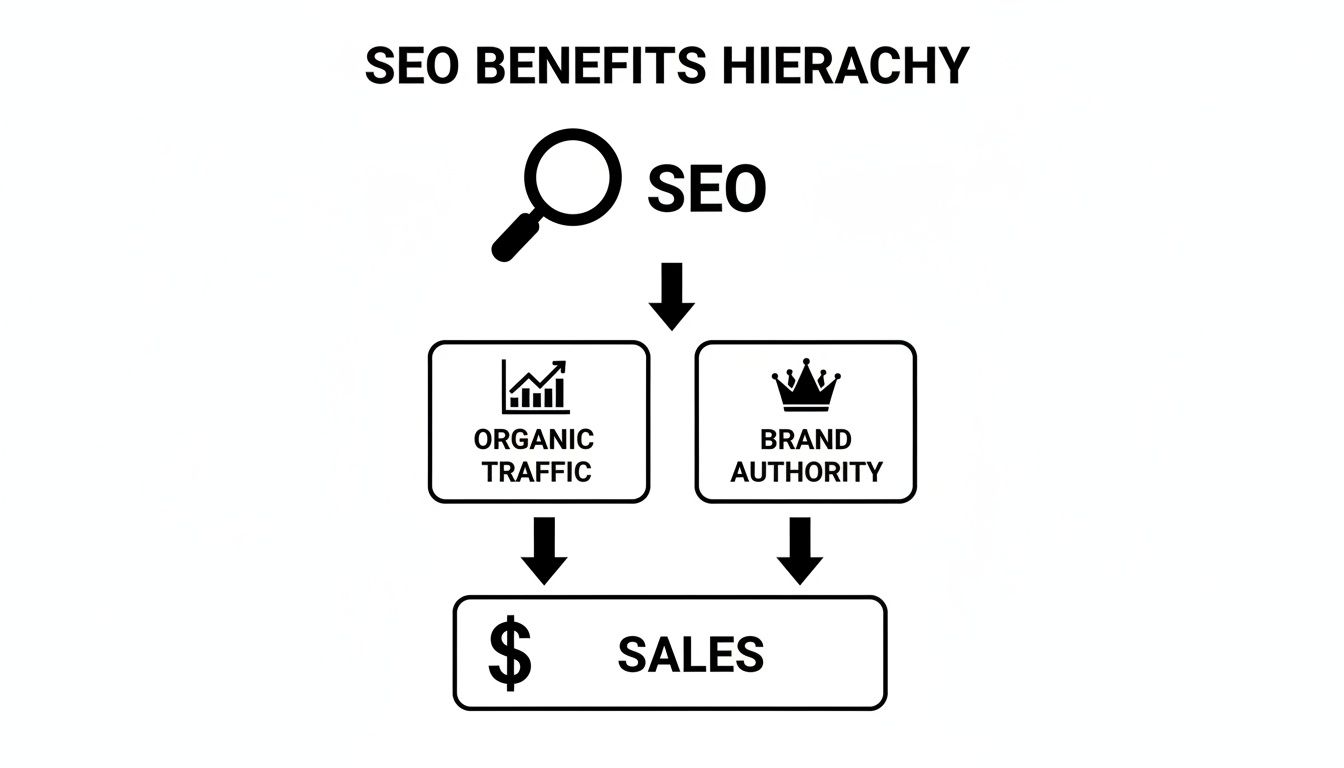
As you can see, strong SEO is the engine that drives organic traffic and builds brand authority, which ultimately leads to more sales. It all starts with getting the structure right.
The Power of a Simple Site Map
A sitemap is exactly what it sounds like: a map of every single page on your website. The good news is you don’t have to build it by hand. Modern ecommerce platforms and WordPress plugins will generate one for you automatically.
Your job is simply to make sure your site’s structure is logical so the map it creates is just as clean. When you submit that map to Google, you’re handing it a perfectly organized guide to your entire store, ensuring it can find and index every product you have for sale.
Think of your site structure as the foundation of your house. If the foundation is weak and confusing, everything you build on top of it—great products, beautiful photos—will be unstable. Get the structure right first, and everything else becomes more effective.
Another key structural choice is how you handle major content sections, like your blog. To dive deeper, check out our guide on whether to use a domain vs. a subdomain for your content. Making the right call here helps keep all your site’s SEO authority in one place.
Crafting Product Pages That Sell and Rank
Think of your product pages as your digital sales floor. Their job is to convince two very different audiences—Google and your customer—that your product is the one they need. This is where the nitty-gritty of ecommerce with best seo really pays off, turning a casual browser into a buyer.
The biggest mistake store owners make is copying and pasting the generic descriptions from their suppliers. This is a huge problem. It not only bores your customers, but it also signals to Google that your page is identical to a dozen others, giving it no reason to rank you.

Writing unique, compelling content for every single product is non-negotiable. It’s your only chance to speak directly to your ideal customer, answer the questions they have in their head, and actually close the sale.
Write Descriptions That Actually Connect
Stop leading with specs and features. No one cares about the material blend until they know why it matters. Your customer is always asking one thing: “What’s in it for me?”
Lead with the benefits. A simple way to do this is to answer three questions before you write a single word:
- Who is this for? Get specific. Picture the person you’re selling to.
- What problem does it solve? Address their frustration or desire head-on.
- How does it make their life better? Paint a clear picture of the “after” state.
Before & After Product Description:
Let’s take a simple product: a heavy-duty, waterproof work boot.
- The Generic (Before): “Model 55 Work Boot. Made with leather and rubber soles. Available in sizes 8-13. Brown.”
- The Benefit-Driven (After): “For the contractor who’s on-site before sunrise. Say goodbye to sore, wet feet after a long day on a muddy job site. Our Model 55 Work Boot keeps you dry, comfortable, and protected, so you can focus on the work, not your feet.”
See the difference? The second version connects. It shows you understand their world and have a direct solution. Once you’ve hooked them with that, then you can get into the details like materials and sizing.
Find the Words Real People Use
To write copy that connects, you need to speak your customer’s language. This is where “long-tail keywords” come into play. It sounds technical, but it’s really just about using the specific phrases people type into Google when they’re ready to buy.
Simple vs. Specific Search:
- A casual browser might search for “baby clothes.”
- Someone ready to buy is much more specific: “organic cotton baby onesie with snaps.”
That specific phrase is your money-maker. Finding these is surprisingly easy. Just start typing a basic product idea into the Google search bar and look at the autocomplete suggestions. Those are real phrases people are actively searching for.
Your job is to weave those terms naturally into your product titles and descriptions. Don’t stuff them in. Just write like a human.
Pictures Sell More Than Words
Great photos are a must. Your customers can’t touch or feel the product, so your images have to do all the heavy lifting. High-quality visuals are proven to reduce returns and build the confidence someone needs to click “buy.”
But your photos aren’t just for people—they’re for Google, too. You can give your images a massive SEO boost with one simple step: name your image files descriptively before uploading them.
Instead of uploading IMG_8475.jpg, rename it to something like waterproof-leather-work-boots-brown.jpg. This tells Google exactly what the image is about and helps you show up in image searches.
Key Takeaway: A product page needs to do more than list features. It has to tell a story, solve a real problem, and use the exact words your customers are searching for. This is what separates a store that just sits there from a store that grows.
Your descriptions need to anticipate questions and build trust, making the decision to buy feel easy. A great description paired with a clear call-to-action is a powerful combo for driving sales. For more on that, check out our guide on optimizing your Add to Cart button for higher conversions.
The Technical Tune-Up Every Store Needs
Don’t let the word “technical” scare you off. A technical tune-up is just like getting the oil changed in your work truck. You don’t have to be a mechanic to know it’s critical for keeping things running—the same goes for your online store.
This isn’t about learning to code. It’s about making sure your site doesn’t frustrate customers or get ignored by Google. We’ll focus on three simple areas where a little maintenance makes a huge difference: site speed, mobile experience, and making your products stand out. These are fixes you can handle without a developer.
Make Your Website Fast Or Lose Sales
A slow website is a sales killer. Every extra second a customer has to wait is another chance for them to get impatient and leave. It’s the online version of walking up to a store with a huge line just to get in the door—most people will just go somewhere else.
The number one culprit? Big, uncompressed product images. You absolutely need gorgeous photos, but they shouldn’t take forever to load.
Luckily, this is an easy fix. Before you upload any product pictures, run them through a free image compression tool like TinyPNG. It shrinks the file size dramatically without making your photos look blurry. Smaller files mean faster load times. This single step can make a massive difference in how quickly your pages pop up for customers.
Your Store Must Work Perfectly On a Phone
These days, your store isn’t just on a computer; it’s in your customer’s pocket. Having a site that works flawlessly on a phone isn’t a “nice-to-have” anymore. It’s a requirement for survival.
The numbers don’t lie. A staggering 75% of all ecommerce website traffic now comes from mobile devices, and 57% of global sales happen on them. If your site is clumsy or hard to read on a phone, you’re basically shutting the door on the majority of your potential customers. Slow-loading sites cost owners over $2 billion in lost sales annually, and speed is even more critical on mobile. You can dig into more stats about ecommerce trends at Taylorscherseo.com.
Here’s a quick test: pull up your own website on your phone. Right now.
- Can you read the text easily without pinching and zooming?
- Are the buttons big enough for your thumb to tap?
- Can you find and buy a product without getting frustrated?
If you answered “no” to any of these, making your site mobile-friendly is your top priority. Most modern ecommerce platforms offer “responsive” themes that automatically adjust to any screen. Make sure you’re using one.
Think of it this way: not having a mobile-friendly website is like telling more than half of your customers they aren’t welcome in your store. It’s the fastest way to lose business to competitors who offer a better experience.
Use Digital Price Tags to Stand Out on Google
Imagine your product sitting on a retail shelf. It has a price tag, maybe a “sale” sticker, and a few key details. Schema markup is the digital version of that for Google. It’s a bit of code that works behind the scenes to give search engines extra info about your products—like price, stock status, and customer reviews.
Don’t worry, you don’t need to write a single line of code. Most modern ecommerce platforms and SEO plugins (like Yoast for WordPress) handle this automatically. You just have to make sure you’re filling out all the product details in your dashboard.
Before & After Schema:
-
A search result (Before):
My Awesome Work Boots – Your Store -
A search result (After):
My Awesome Work Boots – Your Store
★★★★★ (28 Reviews) – $149.99 – In Stock
Which one are you more likely to click? The second one, obviously. It gives you useful information right away, builds trust, and begs for a click. By simply being thorough with your product info, you help Google create these powerful, eye-catching listings, which is a key part of building an ecommerce site with the best SEO.
Using AI to Work Smarter Not Harder
As a store owner, you know your most valuable asset isn’t a product—it’s your time. The good news? You can get a huge chunk of that time back.
Simple AI tools can now handle a lot of the SEO heavy lifting for you.
This isn’t about becoming a data scientist or learning to code. Think of AI as your new intern—one that never needs a coffee break. It can brainstorm ideas, write rough drafts, and organize your thoughts, freeing you up to focus on what you actually do best: run your business.
Where AI Can Make an Immediate Impact
“Artificial intelligence” sounds big and complicated, but its best uses for your store are surprisingly straightforward. It’s the perfect way to get past that blinking cursor on a blank page.
Let’s say you run a home decor shop and writing just isn’t your thing. You can ask an AI tool for an outline on “How to Choose the Right Rug Size for Your Living Room.” In seconds, you have a solid structure ready for you to fill in with your own expert advice.
Here are a few quick wins you can get with AI right now:
- Brainstorming Blog Topics: Ask for post ideas related to what you sell. Think “5 Ways to Style a Linen Scarf” or “DIY Maintenance Tips for Your Lawnmower.”
- Drafting Product Descriptions: Generate a solid first draft for a new product. Then, you just need to polish it up with your brand’s unique voice.
- Writing Social Media Posts: Get instant ideas for catchy captions to promote a new item or an upcoming sale.
The point isn’t to let a robot run your business. It’s a tool to crush writer’s block and speed up your workflow. You’re still the expert; AI just helps you get your knowledge out there faster.
A Practical Example of an AI Workflow
Let’s walk through a real-world scenario. You sell artisanal coffee beans and want to create some helpful content to boost your site’s SEO.
- Idea Generation: You ask your AI tool, “Give me blog post topics for a company that sells single-origin coffee beans.” It might come back with “The Beginner’s Guide to French Press Coffee,” “What’s the Difference Between Light and Dark Roast?” or “Tasting Notes Explained.”
- Outline Creation: You like “The Beginner’s Guide to French Press Coffee,” so you ask the AI to create an outline for it. It spits out sections like “What You’ll Need,” “Step-by-Step Brewing Guide,” and “Common Mistakes to Avoid.”
- Drafting the Content: Now, you can ask it to write a paragraph for each of those sections. You get a complete first draft that you can quickly rewrite in your own words, adding your personal tips and maybe a link to your favorite beans for a French press.
In less than 30 minutes, you’ve gone from a vague idea to a nearly-finished blog post. A task that used to take hours is now a quick part of your week. As you get comfortable, you’ll see there’s a lot to learn about how to use AI for SEO to avoid common mistakes and get the best results.
Simple Rules for Using AI Effectively
To get the most out of these tools without your content sounding generic, you need a few ground rules. This is how you pair technology with your own touch to build an ecommerce site with the best SEO.
- Always Be the Final Editor: Never, ever just copy and paste. Use the AI output as a starting point, then edit heavily to match your brand’s voice and inject your own personality.
- Fact-Check Everything: AI can hallucinate facts or pull outdated information. Always double-check any stats, figures, or instructions before you hit “publish.”
- Focus on Your Expertise: The best content is rooted in your real-world experience. Let AI handle the structure, but make sure the final piece is full of your authentic advice.
Plenty of great tools are out there to get you started. You can find the right one for your needs in our guide to AI content creation tools. Treat AI like a partner, and you’ll be able to create more quality content, improve your SEO, and finally win back some of your time.
Your Frequently Asked Ecommerce SEO Questions
Diving into SEO brings up a lot of questions. We hear the same ones from busy store owners all the time. Here are the straight answers—no fluff.
How Long Does It Take for Ecommerce SEO to Start Working?
Let’s be direct: SEO isn’t a light switch. It’s an investment that builds over time.
You’ll likely start to see some positive movement—like more visitors from Google—within 3 to 6 months of consistent work. This means regularly adding products with good descriptions, fixing site issues, and maybe writing a useful blog post every so often.
The real, game-changing results that bring in reliable sales often take 6 to 12 months to hit their stride.
The power of SEO is that it compounds. Unlike ads that stop when you stop paying, the SEO work you do today becomes a long-term asset. It can generate traffic and sales for years, making it one of the best investments you can make in your business.
Do I Need to Be a Tech Expert to Do My Own SEO?
Absolutely not. If you can write an email and upload a photo, you have the skills you need.
While some SEO gets technical, the work that delivers the biggest wins for an online store is stuff you already know how to do. You are the expert on your products and customers.
Building an ecommerce site with the best SEO comes down to basics:
- Writing clear product descriptions: You know your products best. Answer the questions your customers have before they even think to ask.
- Taking high-quality photos: Help people buy with confidence by showing your products from every angle.
- Organizing your site logically: A simple, clean menu makes it easy for customers and Google to find what they need.
Modern platforms like Shopify and tools like WordPress (with plugins like Yoast SEO) are built to handle the heavy technical stuff for you. This guide is all about the 20% of effort that gets you 80% of the results—no coding required.
Is It Better to Focus on SEO or Just Run Google Ads?
This is a great question. The honest answer: a smart strategy uses both. They just have different jobs.
Google Ads are for speed. Launch a campaign today, and you could see traffic this afternoon. They’re perfect for:
- Testing a new product to see if people want it.
- Promoting a flash sale or seasonal deal.
- Getting instant traffic while your SEO gains traction.
SEO is for sustainability. This is your long game for generating consistent, “free” traffic from Google. As your SEO gets stronger, you build trust with both customers and search engines.
Use ads for quick wins while you build your SEO foundation. Over time, as your organic traffic grows, you can often pull back on ad spend because your SEO is bringing in new customers on its own.
What Is the Single Most Important Thing for My Product Pages?
If you only do one thing, make it this: write a unique description for every single product.
It’s so tempting to copy and paste the manufacturer’s description. We get it, it saves time. But it’s also one of the worst mistakes you can make. Google sees this as “duplicate content” and has no reason to show your page over the hundreds of other stores with the exact same text.
Your product description is your sales pitch. It’s your one chance to speak directly to a shopper and explain why they need your product.
Don’t just list features; sell the benefits. How does it make their life better? What problem does it solve? Answering these questions in your own words is what Google wants to see, and it’s what turns a browser into a buyer. And, don’t forget multilingual site support for more visitors.
Ready to stop worrying about being found on Google and start building a website that works for you? The ReadyWeb AI Blog is your go-to resource for practical tips on web design, SEO, and using AI to grow your business—all explained in plain English. Visit us at https://blog.readywebai.com to learn more.