So, how much does a website for a small business actually cost? A professionally built site will typically land somewhere between $2,000 and $8,000. The final number really depends on who you hire, how complex you want it to be, and what features you absolutely need.
This guide will give you a clear, jargon-free breakdown so you can set a realistic budget and invest with confidence. By the end, you'll know exactly how to get a professional website that works for your business, without getting ripped off or wasting your valuable time.
Your Website Cost Answered in 60 Seconds
Trying to nail down a price for a small business website can be a headache. You see ads for a few hundred dollars right next to quotes for tens of thousands. It’s enough to make you wonder what you really need.
Here’s the simple truth: the price tag is tied directly to your goals. Are you a local plumber who just needs a professional-looking online brochure to build trust? Or are you a boutique owner who wants to start selling products online? Your needs dictate the cost.
This guide is designed to cut through all that noise. We'll look at the three main paths you can take: building it yourself (DIY), hiring a freelance expert, or partnering with a web design agency. By the end, you'll know exactly what makes a website's cost go up or down and feel confident choosing the right option for your business.
Three Paths to Your New Website
Every path involves a different trade-off between your money, your time, and the quality of the final product. Getting a handle on these options is the first step. To get a feel for how different professionals structure their fees, it's helpful to explore common service pricing models which show what you might expect at different investment levels.
- DIY Website Builders: This is the quickest and cheapest way to get online. Using tools like Squarespace or Wix, you build the site yourself using templates. It's a solid choice for simple sites, but be prepared to invest your own time.
- Hiring a Freelancer: The happy medium. You get to work one-on-one with a professional who will build a custom site for you. This strikes a great balance between getting expert quality and keeping costs reasonable.
- Partnering with an Agency: The premium, all-inclusive option. An agency brings a whole team to the table—strategists, designers, writers, and developers. It's the most expensive route, but it's also the most hands-off for you.
To make this even clearer, here's a quick comparison of the three approaches.
Quick Guide to Small Business Website Costs
This table breaks down the three main options for getting a website, showing the typical cost, timeline, and who it's best for.
| Option | Typical Cost | Best For |
|---|---|---|
| DIY Builder | $300 – $1,000 | New businesses with tiny budgets and simple needs (like an online business card). |
| Freelancer | $2,000 – $8,000 | Businesses needing a custom, professional site that generates leads without the high agency price tag. |
| Agency | $8,000 – $25,000+ | Established businesses looking for a complete online strategy and ongoing support. |
Seeing the numbers side-by-side helps you pinpoint the best fit for your budget and goals right now.
Think of a professionally built site as an investment, not just another bill to pay. For many small business owners, the sweet spot is between $4,000 to $8,000. If you just need a basic "brochure" site to look credible online, you could get started for as low as $2,000–$4,000.
Knowing these tiers helps you decide where to focus your search. If you're working with a tight budget, be sure to check out our guide on how to get an affordable website for your small business for more cost-saving tips.
Choosing Your Path: DIY, Freelancer, or Agency?
Deciding how your website gets built is easily the single biggest factor in what it will cost. It’s a lot like a home renovation. You could head to the hardware store and tackle it all yourself, hire a skilled contractor for a specific part of the job, or bring in a full-service firm to manage the entire project from blueprints to final polish.
Each of these paths offers a completely different balance of cost, time, and the quality of the final product. Let's break down the three main options so you can figure out which one really clicks for your business, your budget, and—just as importantly—your schedule.
This decision tree gives you a quick visual on the three main routes to getting your website built, helping you choose based on what you can spend and how much time you have.
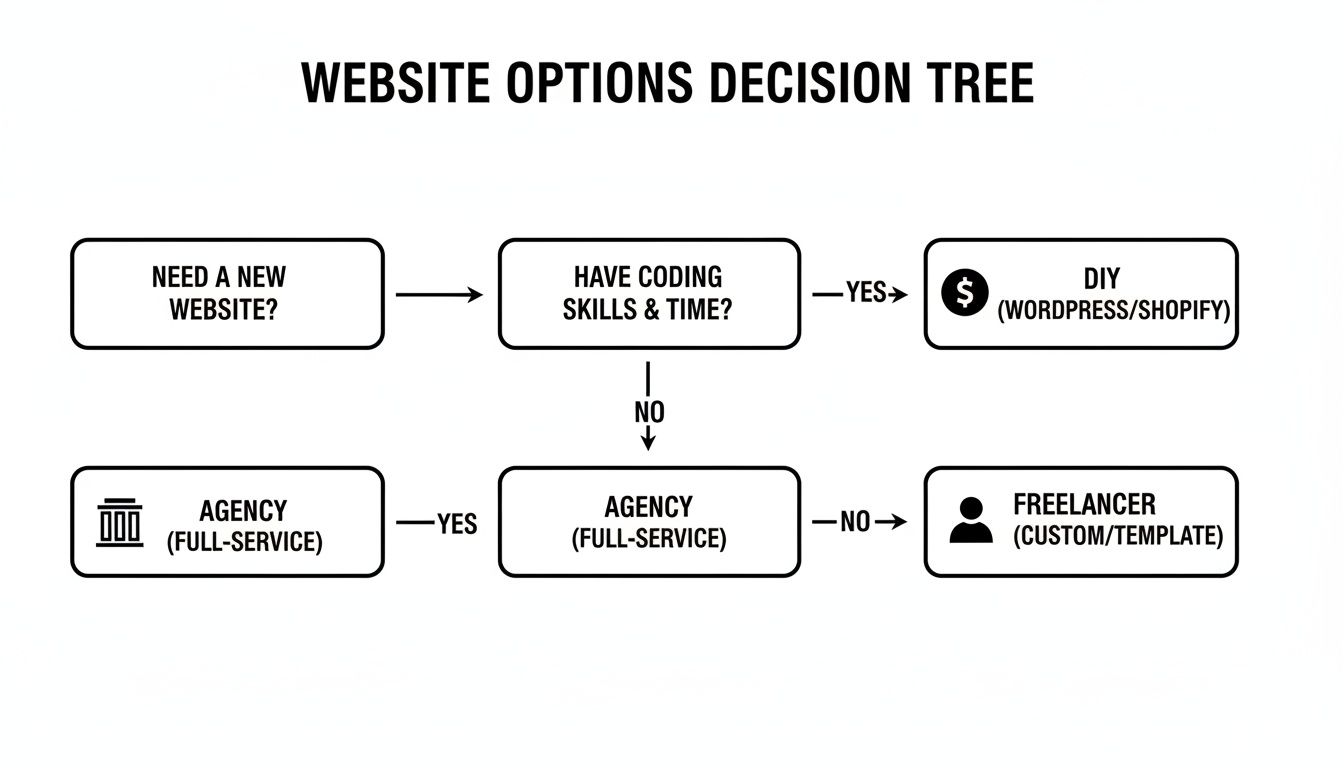
The trade-off is pretty clear: the less money you spend, the more of your own time and effort you'll have to put in.
The DIY Route: Doing It Yourself
Going the Do-It-Yourself (DIY) route is like assembling furniture from a flat-pack box. It's by far the most affordable option up front, but you pay for it with your own time, energy, and patience. You'll be using a website builder—a tool that lets you create a site using pre-made templates and a simple drag-and-drop editor, no coding required.
This is a fantastic starting point for business owners on a shoestring budget or with very straightforward needs. If all you need is an online "business card" with your contact info and a list of services, you can get it done in a weekend.
Who it's for:
- Solo operators and brand-new businesses with a minimal budget.
- Business owners who are generally comfortable with technology and have the time to learn a new tool.
- Anyone who just needs a simple, informational website without complex features like online booking or selling products.
To really get into the weeds on this, check out our complete guide on choosing a small business website builder.
Hiring a Freelancer
Hiring a freelance web designer is more like commissioning a skilled carpenter to build you a custom piece of furniture. You're getting a professional result that's tailored to your exact needs. It’ll cost you more than the DIY kit, but it's less than hiring a whole construction crew.
A freelancer will work with you one-on-one to create a unique site that actually looks and feels like your brand. They handle all the technical heavy lifting and design, delivering a polished, professional product you probably couldn't achieve on your own. This is often the sweet spot for established businesses ready for a more serious online presence.
Who it's for:
- Small businesses that are ready to invest in a professional, custom-designed website to get more customers.
- Owners who have a specific look or feature in mind that templates just can't deliver.
- Those who want expert guidance but don't need the massive team an agency brings to the table.
Partnering with an Agency
Working with a web design agency is the premium, hands-off option. Think of it as hiring a general contractor who brings their entire crew—architects, designers, builders, and electricians—to manage your project from start to finish. You point, and they build.
An agency delivers a complete strategy, not just a website. Their team will handle everything from market research and writing the words on the page to design, development, and even online marketing. This is the most expensive path, but it also demands the least of your personal time and provides an all-in-one solution.
Who it's for:
- Established businesses with a significant budget looking for a comprehensive digital strategy.
- Companies that need complex functionality, like a large-scale online store or a custom web application.
- Owners who want a completely "done-for-you" experience with ongoing support and marketing built-in.
Upfront Build vs. Ongoing Maintenance: What Your Website Really Costs
One of the biggest misconceptions is treating a website like a one-and-done purchase. It’s not a brochure you print once; it's more like buying a car. You’ve got the sticker price to get it out of the dealership, but then you have to pay for gas, insurance, and regular oil changes to actually keep it on the road.
Your website is the exact same. There are the initial costs to build it and the recurring costs to run it. Getting a handle on both is the secret to creating a budget that actually works, without any nasty surprise bills popping up six months from now.
Let's pull back the curtain on what you’re paying for, both at the start and over the long haul.
The Upfront Build Costs
These are the one-time fees for getting your website designed, developed, and launched. This is the "construction phase" of your digital home base, and it's where you'll make your biggest initial investment, whether you're building it yourself, hiring a freelancer, or partnering with an agency.
Here’s what typically makes up that initial price tag:
- Design and Development: This is the big one. It’s the cost for a professional's time and expertise to map out how the site will look and feel, and to build all the technical parts that make it work.
- Initial Content Creation: An empty website doesn't help anyone. This part of the budget covers writing the actual words for your key pages (like "About Us" or "Services") and getting professional photos or graphics to make it look sharp.
- Premium Themes or Plugins: While there are plenty of free tools, you might need to buy a specific premium template (a "theme") for its design quality ($50 – $200) or a specialized add-on (a "plugin") to add a function you can't live without, like a sophisticated booking system.
A lot of business owners get caught off guard by the cost of content. A good copywriter might charge $50 to $150 per page, and a one-day professional photoshoot can easily add $500 to $2,000 to your upfront investment.
Once these initial bills are paid and your site is live, your spending shifts from building it to just keeping it running.
The Ongoing Running Costs
These are the recurring fees—paid monthly or yearly—that keep your website live, secure, and working as it should. Think of this as the gas, insurance, and maintenance for your site. They're usually much smaller than the build cost, but they are absolutely non-negotiable.
Here are the running costs you can expect to see:
- Web Hosting: This is the "rent" you pay for the little piece of the internet where your website files live. Without hosting, your site has nowhere to exist. This can run from $10 to $50+ per month, depending on the power and support you need.
- Domain Name: This is your site’s address, like
YourBusiness.com. You register it annually to keep it in your name, which usually costs about $10 to $20 per year. - SSL Certificate: That little padlock in the browser bar that tells visitors your site is secure? That’s the SSL. Many hosts include a basic one for free, but a more robust certificate could be $10 to $100 per year.
- Maintenance and Security: Just like a car, a website needs regular tune-ups. This means updating software, running security scans, and creating backups. You can try to do this yourself, but many owners pay for a maintenance plan to handle it, typically between $50 and $200 per month.
By splitting your budget into these two buckets—upfront build and ongoing running costs—you get a much clearer picture of how much a small business website costs over its lifetime. It helps you plan realistically, avoiding the shock of an unexpected renewal notice and ensuring your website remains a valuable asset for years to come.
What Features Actually Drive Up Your Website Cost
Have you ever looked at two small business websites that seem pretty similar on the surface, yet one cost $2,000 and the other $20,000? The secret is almost always in the features running behind the scenes.
Think of it like building a house. A basic blueprint gets you four walls and a roof, but adding a custom-designed kitchen, a swimming pool, or a smart home system will dramatically increase the final price. The same exact principle applies to websites.
Getting a handle on which features add the most to the price tag is the key to building a site that actually fits your budget. It helps you draw a clear line between the "must-haves" that will generate business right now and the "nice-to-haves" you can always add later. This way, you're putting your money where it counts without overspending on bells and whistles you don’t need yet.
Let's break down the most common things that make the price go up.
To see how adding different features to your website can affect the total price, check out the table below. This should help you decide what's a 'must-have' versus a 'nice-to-have' for your business.
How Common Features Impact Your Website Cost
| Feature | Basic Version (Lower Cost) | Advanced Version (Higher Cost) | Estimated Cost Impact |
|---|---|---|---|
| Design | Using a pre-built template with your brand colors and logo. | A completely unique design created from scratch by a professional. | +$1,000 to $10,000+ |
| E-commerce | A simple "Buy Now" button linked to PayPal for a few products. | A full online store with a shopping cart, inventory, and shipping. | +$3,000 to $15,000+ |
| Booking System | A contact form for clients to request appointments manually. | A self-service calendar that syncs with your schedule and takes payments. | +$500 to $5,000+ |
| Membership | A single password-protected page for all users. | A full portal with user accounts, subscription payments, and different content for different members. | +$2,500 to $20,000+ |
As you can see, the gap between a "basic" and "advanced" feature can be huge. Let's dig a little deeper into what these differences really mean for your budget.
Custom Design vs. Template-Based Design
This is probably the single biggest decision you'll make that affects the initial cost. It’s a lot like the difference between buying a move-in-ready house in a new development versus hiring an architect to design your dream home from the ground up.
- Template-Based (Lower Cost): A developer takes a pre-designed layout (often called a "theme" or "template") and customizes it with your logo, brand colors, and content. It's much faster and more affordable because the fundamental structure is already in place.
- Custom Design (Higher Cost): A designer starts with a completely blank canvas to create a one-of-a-kind website just for your brand. This involves a lot more strategy, multiple rounds of revisions, and custom coding, all of which take more time and, therefore, cost more. Understanding the real web page design cost is crucial to budgeting correctly and avoiding surprise fees.
E-commerce Functionality
If you want to sell products directly on your site, you’re officially in the e-commerce game. This is a major cost driver because it’s not just about displaying product photos—it's about building a secure, complex system to handle money, data, and logistics. A simple informational website is like a brochure; an e-commerce site is like a fully staffed retail store, complete with a cash register, inventory system, and security guard.
For example, a basic version might just be a "Buy Now" button that sends customers to a third-party site like PayPal. You can sell a few things this way without much fuss.
But an advanced version requires a full shopping cart, integration with shipping carriers, automatic tax calculators, and systems for managing customer accounts, wishlists, and discount codes.
Adding robust e-commerce functionality can easily add $3,000 to $15,000+ to the cost of a website. The complexity of managing products, payments, and customer data requires significant development work to ensure everything is secure and reliable.
Booking and Scheduling Systems
For any service-based business—coaches, consultants, plumbers, you name it—letting clients book appointments online is a huge plus. But how you implement it makes a big difference in cost.
A basic version could be a simple contact form where a potential client suggests a time, and you handle the back-and-forth over email to confirm. It works, but it’s manual.
An advanced version is a fully integrated calendar that shows your real-time availability, syncs with your personal Google or Outlook calendar, and even lets clients pay for their appointment right then and there. This level of automation is fantastic for your workflow but requires more complex setup and often comes with pricey software subscriptions.
Membership and Gated Content
Thinking of offering exclusive content, a private community, or online courses that only paying members can access? This is called a membership portal, and it's another feature that adds serious complexity and cost.
You're essentially building a secure, private club within your website. This requires a login system, a way to manage recurring subscription payments, and different access levels depending on the membership tier. It's far more involved than a simple public site. For an even deeper dive into this topic, our guide on website design for small businesses offers more insights.
By understanding how these key features impact the final bill, you can make smarter decisions and get the most bang for your buck. Start with what you absolutely need to launch and serve your customers today. You can always invest in more advanced features down the road as your business grows.
How to Get a Great Website Without Overspending
Getting a professional website that brings in customers doesn't have to mean draining your bank account. The real secret isn't about finding the absolute cheapest option—it's about becoming a smart, informed buyer. You can absolutely get a high-performing site that looks like it cost a fortune, but for a fraction of the price.
With a few key decisions, you can keep your budget in check, sidestep surprise fees, and launch a website that starts working for you from day one. Let's walk through how to make those smart, money-saving choices without cutting corners on quality.
Start with a Template, Not a Blank Slate
One of the single biggest ways to save thousands of dollars is to build your site from a professional, pre-designed template. Think of it like buying a beautiful, well-designed floor plan for a house instead of hiring an architect to start from scratch. The foundation and structure are already there, and they've been designed by an expert.
Your web designer can then take that solid foundation and customize it to be uniquely yours—adding your logo, brand colors, photos, and all your business-specific text. This approach slashes the design and development time, which is what you're paying for. You end up with a polished, professional website without the hefty price tag of a full custom build.
Launch with Only What You Need Right Now
It’s tempting to want every bell and whistle on your site from the get-go: a full online store, a complex booking calendar, a fancy membership portal. But every feature adds time and money to the project. The smarter play is to launch with just the core features you need to start attracting and serving customers.
For most service businesses, that initial launch list is pretty simple:
- A clear homepage explaining what you do and for whom.
- An in-depth services page.
- An "About Us" page to build that crucial know-like-and-trust factor.
- A straightforward contact page with a form.
Focus on getting the essentials perfect first. You can always add more advanced features like e-commerce or a booking system in a "phase two" after the site starts bringing in some revenue. This phased approach makes the investment feel much less intimidating.
This strategy gets your business online faster and for less money, and it lets you see what your customers actually respond to before you invest further.
Provide Your Own Content to Cut Labor Costs
A surprisingly large chunk of any website budget goes toward content creation—the actual words and pictures on the page. A professional copywriter might charge anywhere from $50 to $150 per page, and a photographer could run you $500 to $2,000 for a single photoshoot. You can knock these costs way down by handling the content yourself.
After all, nobody knows your business better than you do. Start by drafting the text for your main pages. It doesn't need to be perfect; a good designer can help clean it up. The same goes for photos. Modern smartphones take fantastic pictures, and a clear, well-lit photo you took yourself often feels more authentic than a generic stock image anyway.
Be Smart About Stock Photography
If you do need to fill in some gaps with stock photos, you don't have to spend a fortune. While premium photo sites have their place, there are some incredible free resources that won't make your site look like a 90s corporate brochure.
Websites like Unsplash, Pexels, and Pixabay offer millions of high-resolution, professional-grade photos that are completely free for commercial use. Just an hour spent searching on these sites can easily save you hundreds in subscription fees or photography costs. The trick is to pick images that genuinely reflect your brand's personality and connect with your ideal customer. By making savvy choices like these, you stay in the driver's seat of how much your small business website costs.
Creating a Realistic Website Budget for Your Business
Alright, we’ve covered all the individual pieces that go into a website's cost. Now, let’s see how they actually fit together for businesses like yours. I've mapped out three common scenarios to give you a realistic idea of how much a small business website costs in the real world.
These aren't just numbers pulled from thin air. They reflect what I see business owners investing all the time to get the job done right. Find the profile that sounds most like you—it'll be a fantastic starting point for your own budget planning.

Scenario 1: The Solo Contractor
This is your go-to budget if you're a plumber, freelance consultant, or electrician. The goal here is simple: legitimacy. You need an online business card that looks professional, works great on a phone, and gives potential clients an easy way to get in touch.
The Plan: A clean, 3-5 page website built by a freelancer who customizes a professional template. To keep costs down, you'll supply your own photos and write the basic text for the pages yourself.
Sample Budget Breakdown:
- One-Time Costs:
- Freelance Designer (Template Customization): $2,500
- Premium Theme Purchase: $75
- Ongoing Yearly Costs:
- Web Hosting: $180 ($15/month)
- Domain Name: $20
- Total Annual Cost: $200
Total Investment Year One: $2,775
This gets you a sharp, professional site that builds immediate trust and funnels leads right to your inbox without breaking the bank.
Scenario 2: The Local Service Business
Think of a small accounting firm, a local cleaning crew, or a landscaping company. You need more than just a brochure site—you need to actively generate leads and show up when people in your town search on Google. This means more content and some foundational search engine optimization (SEO).
The Plan: A 5-10 page website from a freelancer, with a specific focus on local SEO. This means building out dedicated pages for each of your core services to give you a better shot at ranking in search results.
Sample Budget Breakdown:
- One-Time Costs:
- Freelance Web Designer & Developer: $4,500
- Initial SEO Setup & Copywriting: $1,000
- Ongoing Yearly Costs:
- Managed Web Hosting: $360 ($30/month)
- Domain Name: $20
- Monthly Maintenance Plan: $600 ($50/month)
- Total Annual Cost: $980
Total Investment Year One: $6,480
This investment turns your website into a powerful local marketing engine. It’s not just there to look good; it's built to be found by customers who are actively looking for what you offer.
Scenario 3: The Small E-commerce Shop
This budget is for the local boutique, artist, or specialty food maker who's ready to start selling online. The main goal is a simple, secure, and easy-to-manage online store. This requires building in e-commerce functionality from the very beginning.
The Plan: A WordPress website using the WooCommerce platform, built by a freelancer who specializes in e-commerce. The initial setup includes adding your first 10-20 products, connecting payment gateways, and configuring basic shipping rules.
Sample Budget Breakdown:
- One-Time Costs:
- Freelance E-commerce Developer: $7,000
- Product Photography & Descriptions: $1,500
- Ongoing Yearly Costs:
- Managed E-commerce Hosting: $600 ($50/month)
- Domain & SSL Certificate: $50
- Premium Payment/Shipping Plugins: $300
- Monthly Maintenance Plan: $900 ($75/month)
- Total Annual Cost: $1,850
Total Investment Year One: $10,350
It’s a bigger investment, for sure, but this budget gets you a fully functional online retail operation, ready to process orders and generate revenue from the moment it launches.
Got Questions About Website Costs? We've Got Answers.
When you're thinking about investing in a website, a lot of questions pop up. It's a big step! Let's clear the air and tackle some of the most common ones we hear from business owners every day.
Can You Really Build a Website for Free?
In a technical sense, yes, but for a real business, it’s a non-starter. Think of it like this: "free" website builders often plaster their own ads all over your site. Worse, you're usually stuck with a clunky, unprofessional web address, not your own YourBusiness.com.
For potential customers, a "free" site can be a red flag, suggesting the business might not be fully established or serious. It's not the first impression you want to make.
How Long Will It Take to Get My Site Live?
The timeline really hinges on who's doing the work.
- DIY Website Builder: If you're tech-savvy and your needs are simple, you could realistically get something up and running in a weekend.
- Hiring a Freelancer: A standard project usually lands in the 4 to 8 week range, from the initial conversation to the final launch.
- Partnering with an Agency: This is a much deeper process. Plan on 12 to 16 weeks, sometimes longer, as they handle everything from strategy to design and development.
Why Is There Such a Huge Price Range for Websites?
It all boils down to two things: complexity and the sheer amount of skilled labor involved.
A basic five-page "brochure" website is like getting a room in your house painted—it’s a fairly predictable job with a clear scope. An e-commerce store with hundreds of products, custom features, and a secure payment system? That’s more like building a new extension on your house. It requires architects, electricians, plumbers—a whole team of specialists—and a lot more time and materials.
The biggest "hidden" cost in almost every website project isn't the code or the design—it's creating the content. Business owners consistently underestimate just how much time and effort it takes to write compelling copy and source high-quality photos.
Is It Actually Cheaper to Do It Myself?
In terms of cold, hard cash paid out upfront, the DIY route is always the cheapest. But the real cost is your time.
Think about it: if you value your time at $100 an hour and you sink 60 hours into building and troubleshooting your site, that’s a $6,000 investment of your own time. Suddenly, paying that freelancer $4,000 to do it right doesn't just save you headaches—it's actually the more profitable move for your business.
At ReadyWeb AI Blog, our mission is to give you the clarity you need to build a powerful online presence. For more real-world advice and AI-powered insights, check out our other guides at https://blog.readywebai.com.