So, what's the bottom line? A basic website for a small business can run you anywhere from $500 to $5,000 for the initial setup. If you need it to do more, like sell products online, that number can easily climb past $10,000. The final price tag really boils down to how you build it and what you need it to do.
Understanding the Real Cost of a Website
Trying to pin down the real small business website cost can feel a lot like asking, "How much does a car cost?" The answer is always, "It depends." Are you looking for a dependable used sedan to get you from A to B, or a heavy-duty truck with all the bells and whistles?
Your website is no different. A simple, informational "business card" site will always be more affordable than a full-blown online store designed to handle hundreds of transactions. The purpose and complexity drive the price.
By the end of this guide, you will know exactly how much to budget for a website that gets you more leads—without any confusing tech talk or surprise fees. You'll have a clear roadmap to help you make a smart investment, whether you’re just starting out or ready to upgrade.
To get started, let's look at the typical one-time setup costs for the most common approaches. This will help you quickly see where your budget might fit.
Quick Look At Website Setup Costs
This table summarizes the typical one-time setup costs for different website approaches, helping you quickly identify the best fit for your budget.
| Website Approach | Best For | Typical One-Time Cost |
|---|---|---|
| DIY Website Builder | Solopreneurs, hobbyists, or those on a very tight budget. | $100 – $500 |
| WordPress with a Premium Theme | Businesses wanting more control and scalability on a budget. | $500 – $1,500 |
| Freelance Web Designer | Small businesses needing a professional, semi-custom site. | $1,500 – $5,000 |
| Web Design Agency | Established businesses looking for a fully custom, strategic build. | $5,000 – $25,000+ |
As you can see, the path you choose to build your site is the single biggest factor influencing the cost. Let's dig a little deeper into what drives those numbers.
What Determines the Price Range?
If you talk to different professionals, you'll hear a wide range of figures. A good freelancer might build you a clean, professional site for $1,500 to $5,000, which is a fantastic starting point for many businesses. An agency, on the other hand, often starts in the $5,000 to $10,000 range and goes up from there, bringing a full team and deeper strategy to the table.
The single biggest factor influencing your website's cost is how it gets built. Your choice between doing it yourself (DIY), hiring a freelancer, or partnering with an agency will have the largest impact on your budget.
Ultimately, your website is a tool to help your business grow. Thinking about the cost isn't just about paying an invoice; it's an investment. The trick is to match your spending to your business goals, ensuring you get a site that works hard for you without paying for features you don't need just yet.
Your Three Main Options for Building a Website
Deciding how your website gets built is the single biggest factor that will shape your final cost. Think of it like building a new deck for your house. You could grab a DIY kit from the hardware store, hire a skilled local carpenter, or bring in a full-service design-and-build firm to handle every last detail. Each path has a very different impact on your time and your bank account.
This section will walk you through each option so you can confidently pick the right one for your budget, your timeline, and just how hands-on you're willing to get.
This decision tree gives you a quick visual on which path might make the most sense based on what you're looking to spend upfront.
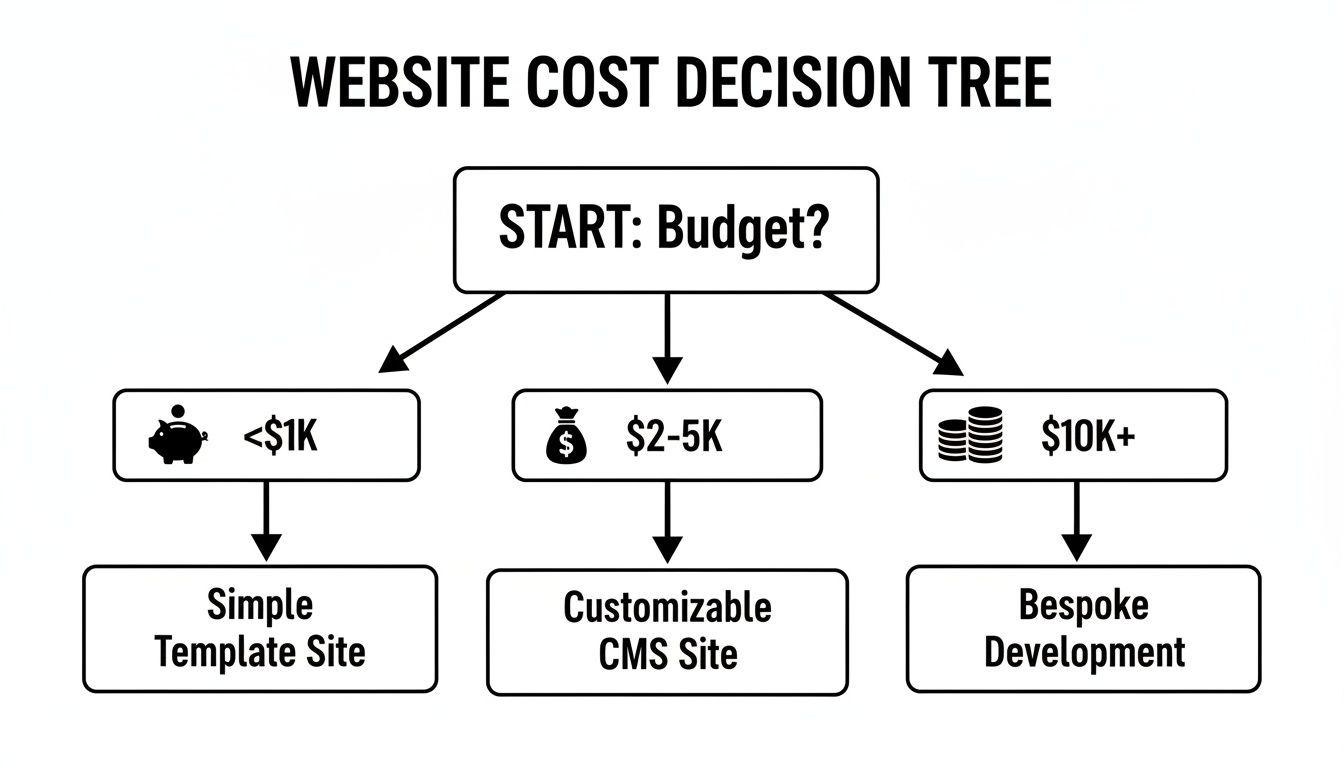
As you can see, your budget is the first fork in the road, steering you toward either a DIY solution, working with a freelancer, or partnering with an agency.
Path 1: The Do-It-Yourself (DIY) Approach
Going the DIY route is, without a doubt, the most budget-friendly way to get your business online. Platforms like Wix or Squarespace let you build a surprisingly professional-looking site without ever having to write a single line of code. This is your "deck-in-a-box" option—you'll save a ton of money, but you're also the one doing all the heavy lifting.
- Best For: Brand-new businesses, solo entrepreneurs, or anyone on a shoestring budget (under $1,000) who has more time than money.
- Typical Cost: Expect to spend between $100 to $500 for your first year. This usually covers the platform subscription, your domain name, and maybe a premium template to get you started.
- The Trade-off: It's a simple one. What you save in cash, you pay for in your own time. You'll be the designer, copywriter, and tech support all rolled into one.
Path 2: Hiring a Freelancer
Bringing on a freelance web designer is like calling in that skilled carpenter. You get a high-quality, professional result from an expert, but you skip the high overhead that comes with a bigger company. A good freelancer will walk you through the process, create a design that actually fits your brand, and manage all the technical bits and pieces.
For most small businesses, this path strikes the perfect balance between cost and quality. You get a custom-built website that performs well, freeing you up to do what you do best: run your business.
Freelancers also give you a huge leg up in speed and expertise. They can launch a polished, mobile-friendly website much faster than you ever could on your own.
Path 3: Partnering with an Agency
Working with a web design agency is the full-service, white-glove approach. This is your design-and-build firm that manages the entire project, from the initial blueprints to the final coat of sealant on the deck. Agencies come with a whole team of specialists—designers, developers, writers, and strategists—all working on your project.
They do a deep dive into your business goals to build a high-performance website that's truly designed for growth. Of course, that level of service comes with a premium price tag. Agency projects often involve completely custom designs, in-depth strategy sessions, and ongoing support, making them a much better fit for established businesses with larger budgets to invest.
Research shows that mid-tier agencies often price projects between $2,000 and $5,000 for growing businesses that need a more strategic digital presence.
Making the right choice here is critical. You can explore a more detailed comparison in our article on the best website options for small business owners.
Uncovering the Hidden Ongoing Website Costs
The price you pay to build your website is just the starting line. Too many business owners get a great-looking site built, only to be caught off guard by the recurring fees needed to keep it live, secure, and running smoothly.
Think of it like buying a delivery van for your business. The purchase is the big one-time expense, but you still have to pay for gas, insurance, and regular oil changes to keep it on the road. Your website works the same way, needing small but consistent investments to keep it performing for you.
Let’s pull back the curtain on these recurring expenses. Once you understand them, you can build a realistic budget that accounts for the true cost of owning a website—no surprises.
The Must-Have Recurring Fees
Every website, from the simplest one-page brochure to a complex online store, has a few non-negotiable costs. These are the absolute essentials for staying online.
Domain Name: This is your website's address on the internet, like
YourBusiness.com. You're essentially renting this address, and renewals typically cost between $10 to $20 per year. It's a small fee, but a critical one.Website Hosting: If the domain is your address, hosting is the physical plot of land where your website lives. It’s the server space that stores all your files, images, and content so people can access your site. Hosting costs vary quite a bit, from $5 to $50 per month for standard shared plans.
SSL Certificate: That little padlock you see next to a website's address in your browser? That's the SSL certificate at work. It encrypts data and tells visitors your site is secure, which is absolutely vital for building trust. Many hosting plans include a free SSL, but some businesses may need a more advanced certificate, which can cost $50 to $150 per year.
You can think of these three things—domain, hosting, and SSL—as your website's utilities. You simply can't have a functioning, trustworthy site without them.
To help you get a clearer picture, here's a quick breakdown of what you can expect to pay annually to keep your site running.
Typical Ongoing Website Expenses
This table outlines the most common recurring costs you should budget for after your website is built.
| Expense Item | What It Is For | Typical Annual Cost |
|---|---|---|
| Domain Name | Your website's unique address (e.g., yourbusiness.com). | $10 – $20 |
| Website Hosting | The server space where your website's files are stored and made accessible online. | $60 – $600 |
| SSL Certificate | Encrypts data to secure your site and show visitors it's safe (often included with hosting). | $0 – $150 |
| Premium Plugins/Apps | Paid software for extra features like e-commerce, advanced forms, or booking systems. | $50 – $500+ |
| Email Hosting | Professional email addresses at your domain (e.g., you@yourbusiness.com). | $72 – $180 per user |
| Maintenance & Support | Regular updates, security scans, and backups to keep your site healthy and secure. | $600 – $3,600+ |
| Content & SEO | Creating blog posts, updating pages, and optimizing for search engines to attract traffic. | $1,200 – $10,000+ |
| Transaction Fees | A percentage of sales processed through payment gateways like Stripe or PayPal (for e-commerce). | ~2.9% + $0.30 per sale |
Remember, these numbers are estimates. Your actual costs will depend entirely on the tools you choose and the complexity of your website.
Planning for Maintenance and Updates
Beyond the absolute basics, you have to plan for keeping your site healthy. A website isn't a "set it and forget it" asset. Just like a car, it needs regular tune-ups to perform well and stay secure from hackers. We call this website maintenance.
Maintenance involves things like updating software and plugins, fixing broken links, and backing up your data. You can learn to do this yourself, but for most busy owners, paying a professional a monthly fee is the smarter move.
Industry data shows that most agencies recommend budgeting $100 to $300 monthly for post-launch updates and general support. This is a realistic starting point to get a sense of these ongoing website expenses and how they fit into your overall budget.
How Website Features Drive Up Your Final Price
Ever wondered why one website costs $1,000 while another with a similar look and feel costs $10,000? The answer almost always comes down to the features packed under the hood.
Think of it like buying a new truck for your business. The basic model gets you from A to B, but adding a heavy-duty tow package, a GPS navigation system, or a custom toolbox will each bump up the final price. Your website works the exact same way.
A simple "brochure" website that just lists your services and phone number is the base model. The moment you need it to do more for your customers—like sell products or book appointments—you're adding complexity, and that’s what really drives up the cost.
This section breaks down how common features impact your budget. Understanding this will help you prioritize what you need on day one versus what can wait, giving you total control over your spending.
Common Features and Their Cost Impact
Let's look at some of the most requested features and see how they can change a project's scope and price tag. Imagine your starting point is a basic five-page website (Home, About, Services, Blog, Contact) that costs around $2,500.
Now, let's see what happens when we start adding some popular upgrades:
E-commerce Functionality: This is the big one. Adding an online store is like building an entire digital retail space. It requires product pages, a shopping cart, a secure checkout process, and systems to manage inventory and shipping.
- Cost Impact: Can easily add $2,000 to $10,000+ to your initial cost, depending on the number of products and how complex your store needs to be.
- Before: Your website is a digital brochure.
- After: Your website is a 24/7 sales machine.
Appointment Booking System: If you’re a consultant, mechanic, or stylist, letting clients book appointments online is a game-changer. This feature requires integrating a calendar, setting up automated email reminders, and often connecting to a payment system for deposits.
- Cost Impact: Typically adds $500 to $2,500 to the project.
- Before: You spend hours on the phone scheduling appointments.
- After: Clients book and pay for their own appointments online, saving you time.
Custom Membership or Login Area: Want to create a private area for clients to log in and access exclusive content? This adds a significant layer of development, requiring user accounts, security measures, and a system to manage member data.
- Cost Impact: Often adds $1,500 to $7,500+ to the base price.
- Before: You email private documents to each client individually.
- After: Clients can log in and access their information securely at any time.
Visualizing the Cost Buildup
It's easy to see how a simple project can quickly become more expensive. Your initial quote can swell as you start realizing all the powerful things your site could do to help run your business.
Think of features as à la carte items on a menu. Each one you add has its own price. The key is to only order what you’re actually going to use and what will directly help your business make more money or save more time.
For a deeper dive into creating a site that looks professional right from the start, check out our guide on effective website design for small business.
Ultimately, every single feature should have a clear business purpose. If adding online booking will free up an hour of your day from answering phone calls, it’s likely a fantastic investment. But if a fancy animated photo gallery won't directly lead to more paying clients, it might be something to put on the "Phase Two" list.
Smart Ways to Lower Your Website Costs

A professional, high-performing website doesn't need to drain your bank account. With a few smart decisions upfront, you can significantly cut your small business website cost and still end up with a site that builds trust and brings in customers.
Think of it like renovating a kitchen. You could save a bundle by choosing high-quality stock cabinets instead of custom ones, or by painting the room yourself. The same logic applies here—put your money where it counts the most and handle the simpler tasks yourself to keep the budget under control.
Prepare Your Materials Beforehand
One of the easiest ways to save money is to show up prepared. Countless hours—and dollars—get burned while a designer waits for you to write the text for your "About Us" page or hunt down photos of your work.
Pro Tip: Before you hire anyone or even sign up for a DIY builder, get all your essential materials together in one folder. This means your logo, company info, service descriptions, and any photos you want to use.
When you hand everything over in a complete package, you cut down on the back-and-forth and let the project flow smoothly. That means fewer billable hours for you. This simple prep work can make a huge difference in the final timeline and cost.
Embrace High-Quality Templates
A fully custom website, built from the ground up, is the most expensive route you can take. For most small businesses, it’s also completely unnecessary. Today's pre-made website templates are beautifully designed, mobile-friendly, and easy to customize with your own branding.
- Custom Design: This is like hiring an architect to design a one-of-a-kind house. It gives you total freedom but comes with a hefty price tag.
- Template Design: This is more like picking an amazing pre-designed floor plan and then choosing your own finishes. It's faster, far more affordable, and you still get a stunning, professional result.
Choosing a premium template can give you 80% of the benefit of a custom design for 20% of the cost. It's often the single biggest cost-saving decision you can make.
Launch in Phases and Use AI Tools
Your website doesn't need every bell and whistle on day one. A much savvier approach is to launch a simple, professional "Phase One" site that just covers the essentials: who you are, what you do, and how people can get in touch.
Then, as your business grows, you can roll out "Phase Two" with more advanced features like online booking or an e-commerce store. This phased approach spreads the cost out over time and makes sure you're only paying for features you actually need, when you need them.
You can also use modern AI writing assistants to help draft your initial page content or come up with blog post ideas, which can reduce the need to hire a copywriter right away. This kind of strategic planning is the key to building an affordable website for your small business that can grow right alongside you.
Your Simple Website Budget Planning Tool
Alright, now that we’ve unpacked all the pieces that go into a website’s cost, it’s time to get practical and build a real financial plan. A simple budget worksheet is the best way to cut through the confusion and get a confident handle on what your small business website will actually cost.
This isn't about complex spreadsheets. It's about taking a moment to list your absolute must-haves, then figuring out the one-time setup fees and the recurring monthly bills. Before you even think about talking to a developer or signing up for a service, grab a pen and paper (or open a new doc) and answer these questions. This little exercise will give you a powerful snapshot of your true budget.
The Five-Minute Budget Worksheet
Use these prompts to quickly map out your initial website investment and the costs you'll have to cover every month. Doing this will bring amazing clarity to your project and help you sidestep the common trap of paying for bells and whistles you just don't need right now.
- My #1 Goal for This Website Is: (Example: "To get at least 10 new plumbing leads per month.")
- Must-Have Features (Phase One): (Example: "A contact form, a photo gallery of my work, and a simple list of services.")
- My Chosen Build Option: (Example: "I'll hire a freelancer to customize a WordPress template.")
- Estimated One-Time Setup Cost: (Example: "**$2,500* for the freelancer's time and expertise.")*
- Estimated Ongoing Monthly Cost: (Example: "**$15* for hosting + $50 for a maintenance plan = $65/month.")*
See how that works? With just this simple outline, a plumber or a fitness coach can create a realistic financial plan. You now have a clear number for both your upfront investment and your monthly operational costs, putting you in complete control of your budget.
Common Questions We Hear About Website Costs
Let's tackle some of the most common questions that pop up when small business owners start thinking about website pricing. Getting these cleared up can make the whole process feel a lot less intimidating.
Is It Possible to Get a Professional Website for Under $1000?
You bet. For under $1,000, you can absolutely get a sharp, professional-looking website. This budget is perfect for hiring a talented freelancer to customize a premium template or for signing up for an annual plan with a top-tier DIY builder like Squarespace or Wix.
This is an ideal route for service-based businesses—think contractors, consultants, or photographers—who primarily need an elegant online brochure and a solid contact form to generate new leads.
How Long Does It Actually Take to Build a Website?
The timeline really hinges on the path you take. If you go the DIY route and have all your text and images ready, you could technically have a site up and running in a single weekend.
Working with a freelancer is a bit more structured and usually takes around 2-4 weeks from the initial kickoff to the final launch.
If you bring in an agency, you're looking at a more comprehensive process. Expect a timeline of 1-3 months, sometimes longer, depending on how complex the site is and how many people need to sign off on each stage.
Do I Really Need to Pay for Website Maintenance?
Honestly, yes. Maintenance isn't just a nice-to-have; it's essential for keeping your website secure, fast, and functioning correctly. The absolute bare minimum is keeping your software updated to patch security holes that hackers love to find.
You can definitely learn to handle these updates yourself. But many business owners find the peace of mind that comes with paying a pro a small monthly fee—typically $50 to $150—is well worth it. It frees you up to do what you do best: run your business.
What's the Cheapest Way to Get a Website Online?
The rock-bottom cheapest method is to use a free plan from a DIY website builder. Just be aware that these come with strings attached, like forced ads on your site and a branded domain name (like yourbusiness.wixsite.com), which doesn't look very professional.
For the most affordable professional option, your best bet is a paid plan from a builder like Wix or Squarespace. These plans bundle everything you need—hosting, security, and design tools—into one predictable monthly fee, so you can start off on the right foot without breaking the bank.
Ready to build a smart, affordable website that grows with your business? The ReadyWeb AI Blog is your go-to resource for practical tips, AI-powered strategies, and straightforward guides. Check out more articles and tutorials for actionable advice.